
Giveaway: Steganos Privacy Suite 22 (1-Year) – Encrypt Files and Manage Passwords

 jasmine
 Table of Contents
What is the Steganos Privacy Suite?
Steganos Privacy Suite 22 protects private files and passwords from unauthorized access. It combines encrypted data storage with a password manager, using AES-256 encryption to secure sensitive information. You can create encrypted safes, sync them through cloud services, and access shared safes over a network. The built-in password manager stores login details, fills passwords in browsers and apps, and supports Chrome, Firefox, and Edge. Steganos Shredder can also permanently delete unwanted files.

Key features
- Encrypt files and confidential data with AES-256 and PBKDF2.
- Sync encrypted vaults through supported cloud services.
- Share network safes that multiple users can access.
- Mount encrypted safes as drives inside Windows.
- Fill passwords automatically in browsers and supported apps.
- Add TOTP authentication to protected safes.
- Permanently delete files and overwrite free disk space with Steganos Shredder.
| Version | 22 (giveaway build) |
| Supported OS | Windows (iOS/Android for autofill) |
| File size | 78.8 MB |
| License type | 1-Year, personal use |
| Publisher | Steganos |
| Category | Privacy, encryption |
Our Quick Test
Based on the activation process, registration requires a Steganos account and an email address. You first register through the giveaway form, then install the app and sign into that same account. The giveaway is restricted to personal use. Free support is also excluded, so account or activation problems may require self-service troubleshooting. This deal fits home users who need encrypted storage and password management for the license period.
How to get the key for Steganos Privacy Suite 22?
Special Offer
Cyberscrub Privacy Suite
NewSoftwares Folder Lock
Instruction
Step 1. Sign in to your existing Steganos account or create a new account.
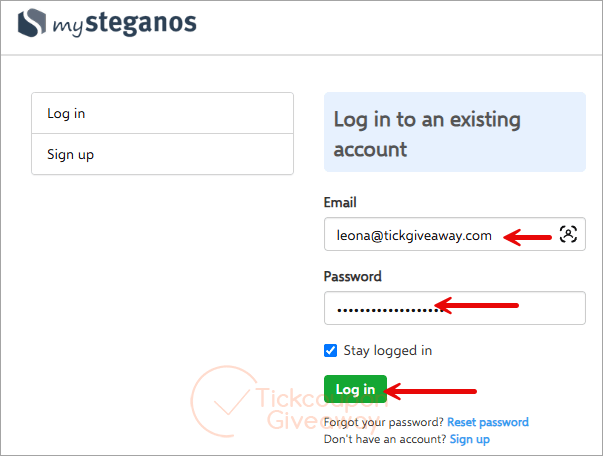
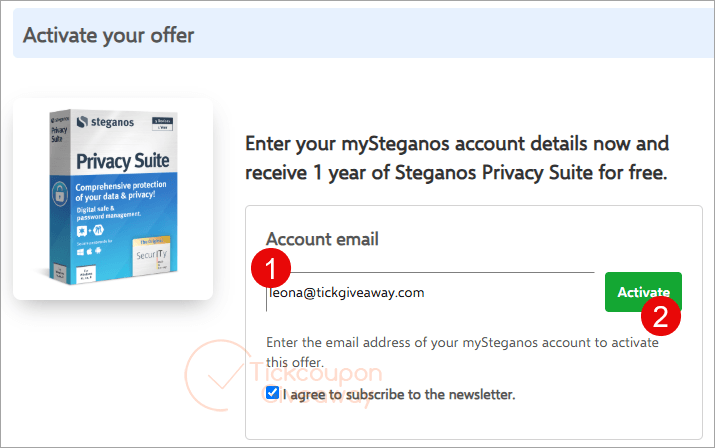
Step 2. Open the Steganos Privacy Suite giveaway link. Enter your email address and submit the registration form.
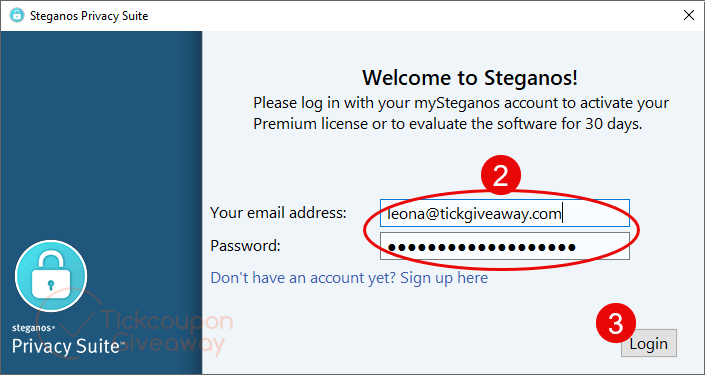
Step 3. Download version 22 using the download file above, then install it on your computer. Click “I already have a Steganos account,” then enter your registered email address and password.
Step 4. Got it for 1-year free!
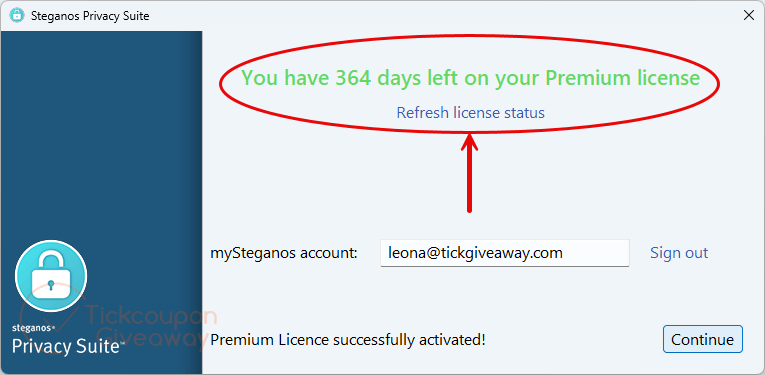
Having trouble?
- The activation is rejected: Make sure you installed the giveaway build specified above. Then sign in with the account used for registration.
- The giveaway registration is no longer available: The promotion may have reached its available registration limit. Leave a comment so we can check for another giveaway opportunity.



If you have system protection/System Restore enabled on a drive this and any other file eraser simply cannot successfully erase files or folders as the data will be shadow-copied into the VSS database and can be recovered by system restore or other programs that let you browse the VSS database as well as deep scan data-recovery software as they will pickup the shadow-copies in the VSS database. To have chance of securely deleting data you MUST disable system protection/System Restore on the NTFS volume and erease free space and then and only then can files be successfully overwrite erased.
I couldn’t refrain from commenting. Well written!
Hi, Could you please give me the download link? Thank you!
Hi Liwenbus,
This is download link for Steganos Privacy Suite 19: https://file.steganos.com/software/sss19int.exe
Thank you so much~
Its not my first time to pay a visit this web page, i am
visiting this web site dailly and obtain good facts from here everyday.