

Apeaksoft Screen Recorder Key Free – Capture Everything in HD – Screen, Audio, and Webcam
 january
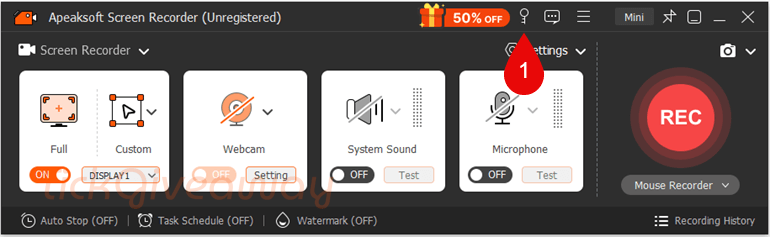
 Apeaksoft Screen Recorder is a professional screen recorder tool that can help you record any video and audio played on your Windows PC and Mac. With it, you can record any on-screen activities you want with original image/sound quality. For example, you can record online videos, Skype calls, GoToMeeting, games, podcasts, webinars, lectures, online conferences, webcam videos, etc., on a full screen or in a customised screen size. You can also annotate the recording with a text box, arrow, highlight, and more. Apeaksoft Screen Recorder lets you make various settings before video and audio recording.
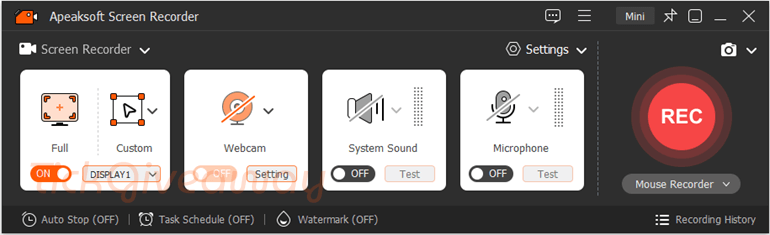
Table of Contents
What Does Apeaksoft Screen Recorder Help You Do?
- Record on-screen activity with system audio, microphone input, or both.
- Capture a full screen, a selected area, or a single application window.
- Save gameplay, online meetings, tutorials, or presentations as video files.
- Record webcam footage alone or alongside the screen.
- Schedule recordings to start and stop automatically.
Apeaksoft Screen Recorder Giveaway Details & How to Join
Giveaway Overview
| Version included | v2.3.50 |
| License type | 1-year license for 1 PC |
| License duration | 1 year |
| Updates | Free updates during the license period |
| Technical support | Not included |
| Supported platforms | Windows 11, 10, 8.1, 8, 7, Vista, XP (SP2 or later) |
| Original price | $29.90 (1-month license) |
How to Join
Apeaksoft Screen Recorder is the most professional way to record any online and streaming video/audio in various popular formats and take snapshots of games and screens with high quality. Apeaksoft Screen Recorder license usually costs $47.96, but now you can get it for 100% free. Just follow the steps below to get Apeaksoft Screen Recorder for free.
Step 1. Visit the Apeaksoft Screen Recorder giveaway page
50% Off Apeaksoft Screen Recorder - Monthly Coupon Code
50% Off Apeaksoft Screen Recorder - Lifetime Coupon Code
20% Off Apeaksoft Screen Recorder - 3 PCs Coupon Code
50% Off Apeaksoft Screen Recorder for Mac - Monthly Coupon Code
50% Off Apeaksoft Screen Recorder for Mac - Lifetime Coupon Code
20% Off Apeaksoft Screen Recorder for Mac - 3 Macs Coupon Code
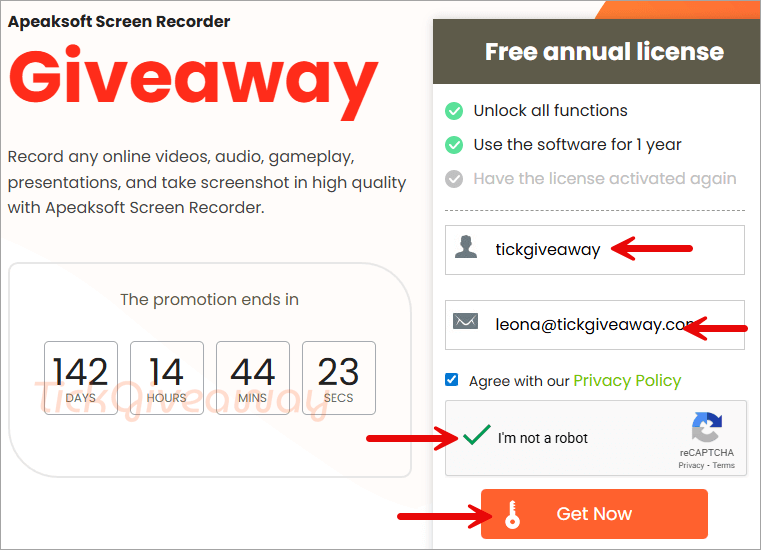
Step 2. Enter your Name and E-mail Address, then click on the “Register” button to get the annual license via E-mail
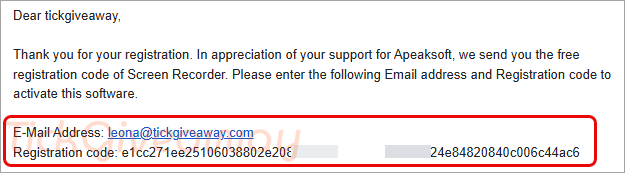
Step 3. Check your mailbox to get the registration code
Step 4. Download the installer for Apeaksoft Screen Recorder –> screen-recorder.exe
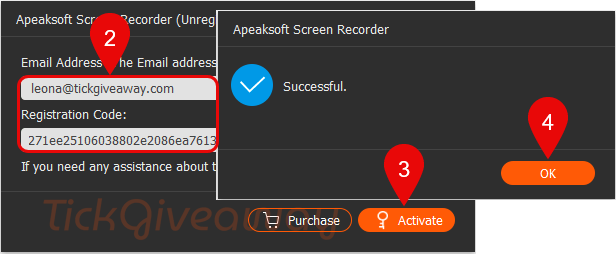
Activate with your email and your license key and enjoy Apeaksoft Screen Recorder for 1-year.
Who Is This Giveaway Most Useful For?
- Students and educators who need to record online classes, presentations, or study sessions
- Remote workers who want to save meetings, demos, or internal training materials
- Gamers and streamers interested in capturing gameplay clips or walkthroughs
- Content creators and vloggers who record tutorials, app demonstrations, or screen-based videos
If your recording needs are personal rather than commercial, this giveaway may be a practical way to test a more advanced tool for a full year.
Terms & Conditions
- The license is valid for one computer only
- Usage is limited to non-commercial purposes
- The free license lasts one year from activation
- Software updates are included during the license period
- Technical support is not provided with this giveaway license
- Activation requires an email address and registration code
- Giveaway availability and limits are defined by the organiser
- Register before Mar 1st, 2026 GMT+0 08:00
Common Questions About This Giveaway
Is this a lifetime license?
No. The giveaway provides a 1-year license as specified by the organizer.
Can I use it for commercial projects?
No. The license is limited to non-commercial use.
Do I need to enter payment details to join?
No payment information is required to register for this giveaway.
Are updates included during the free period?
Yes. Updates are available for the duration of the 1-year license.


just another Chinese illegal closed source user interface pirating a GPLv3 or undistributeable build of FFMPEG to do the actual capture and conversion. I prefer to give my patronage to LEGAL user interfaces that correctly attribute the FFMPEG project and abide by their license terms like xmedia recode or handbrake. I certainly would NEVER PAY Chinese software pirates for their illegal GUIs.
why cant i get the free licens
Hi Billy,
The Giveaway of Apeaksoft Screen Recorder is over. You can use the free trial of Apeaksoft Screen Recorder to capture videos, audio and take screenshots.
Thanks!!!