

Giveaway: SoftOrbits AI Photo Culling (Lifetime) – Cull Bad Photos and Rank Keepers

 Leona
Leona What is SoftOrbits AI Photo Culling?
SoftOrbits AI Photo Culling is built for the part of photography most people postpone: sorting a large folder after the shoot. It scans your images, flags technical problems, groups similar frames, and gives each photo a score to help you spot stronger candidates faster. This tool does not make the final decision for you. Instead, SoftOrbits AI Photo Culling cuts down the number of photos you need to inspect closely, which can be useful after trips, family events, burst shooting, or a long-overdue archive cleanup.
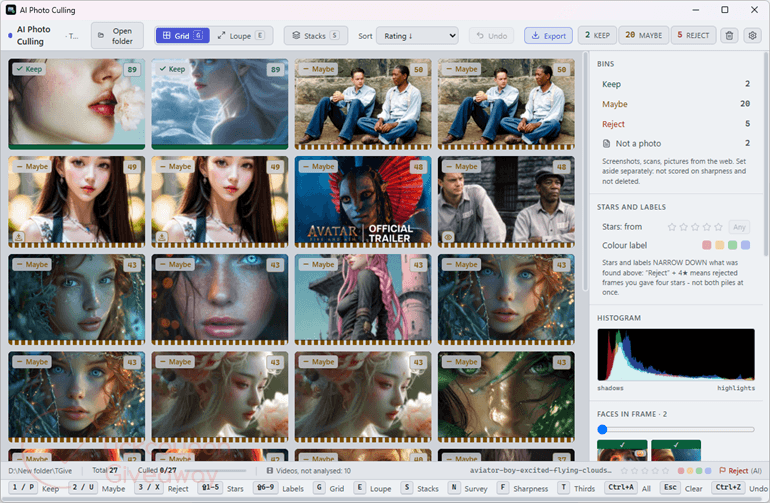
Table of Contents
Key Features
- Score each frame from 0 to 100 using technical quality, beauty, and composition.
- Flag blur, closed eyes, exposure issues, and framing problems with visible reasons.
- Group near-duplicate bursts using shooting time and visual similarity.
- Protect HDR bracketed series from bulk rejection.
- Compare similar frames side by side with synchronized zoom.
- Write stars and flags to XMP sidecars for photo-editing workflows.
| Version | v1.0 (giveaway build) |
| Supported OS | Windows 7, Windows 10, Windows 11 |
| File size | 147 MB |
| License type | Lifetime license, non-commercial use |
| Publisher | SoftOrbits |
| Category | Photo editor |
Our Quick Test
During activation, installation uses the supplied giveaway installer, followed by license-key activation in the app. The license stays with this giveaway build, so moving to a future upgrade may leave the key unusable. Support is also excluded, so activation issues need to be resolved using the supplied installer and key. This giveaway suits photographers who want a permanent personal-use culling tool and can accept those restrictions.
How to Get the Free License Key
Instructions
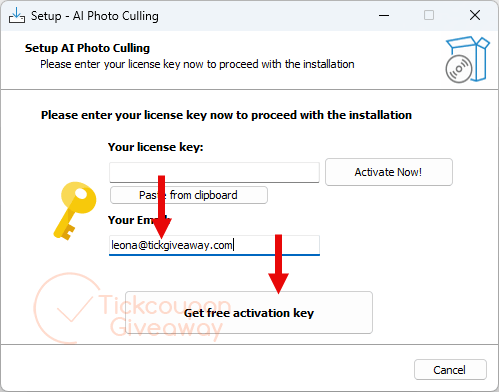
Step 1. Download the giveaway installer software from the giveaway download link above. Run the installer, supplying your email when setup requests it.
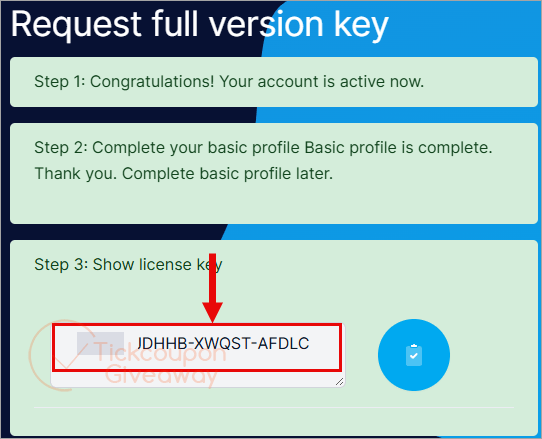
Step 2. You will be taken directly to the giveaway page. Complete the basic profile on the giveaway page to receive your license key.
Step 3. Paste the license code into the app’s Register window.
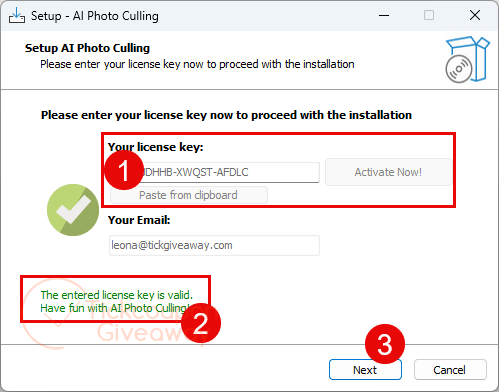
Step 4. Got it for a lifetime for free!
Troubleshooting
- The key shows as invalid.
Use the installer linked in this giveaway. A different build may not accept the supplied key. - No giveaway keys are available.
Leave a comment on the giveaway page so the issue can be checked.
Special Offer
Excire Foto
Duplicate Photo Cleaner
PictureEcho - Single Solution (1 PC)
Nero DuplicateManager 2026
Who is it for?
Trip photographers can use it to shorten the first pass through large holiday folders. Burst grouping helps reduce repeated frames before choosing keepers.
Parents can sort repeated shots of moving children without opening every similar frame separately. The final choice still stays with the photographer.
It can also help with older archives. Screenshots, scans, weak photos, and repeated series can be separated for review.
Common Questions
What does photo culling mean?
Photo culling is the first sorting pass after a shoot. You decide which frames deserve further editing or keeping.
Does the app delete rejected photos?
Rejecting a frame marks it for handling rather than immediately deleting it. Rejected items can be moved into a separate folder.
Does it judge appearance or only technical quality?
It measures technical quality and also scores beauty and composition. Technical faults carry more weight in the overall rating.
Can it work with camera RAW files?
Yes. The supplied product information lists more than 25 RAW formats, including CR2, CR3, NEF, ARW, RAF, ORF, RW2, PEF, and DNG.





WARNING Softorbits DO NOT RESPECT THE INTEGRITY OF YOUR SYSTEMS. They build their programs and installers to bypass admin protections on program installation to allow non-admins like children and employees to install programs when they are not authorised or allowed to install unauthorised programs. They FORCE installation to the system drive, and force installation into an insecure folder hierarchy in the user AppData folders subfolder which is not write protected against non-elevated malware. I do not recommend the installation of products by such a self-serving malicious developer on your machines.
This AI is not accurate and the thumbnails too small to be able to verify visually if it’s accurate or not.