

Giveaway: AOMEI Backupper Professional – PC Backup & Restore, Sync and Clone Software

 jasmine
 Table of Contents
What is AOMEI Backupper Professional?
AOMEI Backupper Pro is a professional backup and recovery program that is simple to use. It completely safeguards your PC against data loss. It securely backs up your PC and server, offers a one-click backup of your system partition or drive, and does it in minutes. It can also clone partitions or drives. The program supports Microsoft Volume Shadow Copy Service (VSS), which allows data backup without interfering with current applications. If your data is accidentally destroyed or corrupted, the application may inspect the generated image and restore it to the hard drive. Additionally, you may create a bootable recovery CD to restore your data if the computer fails and the application is unreachable via the Windows interface.
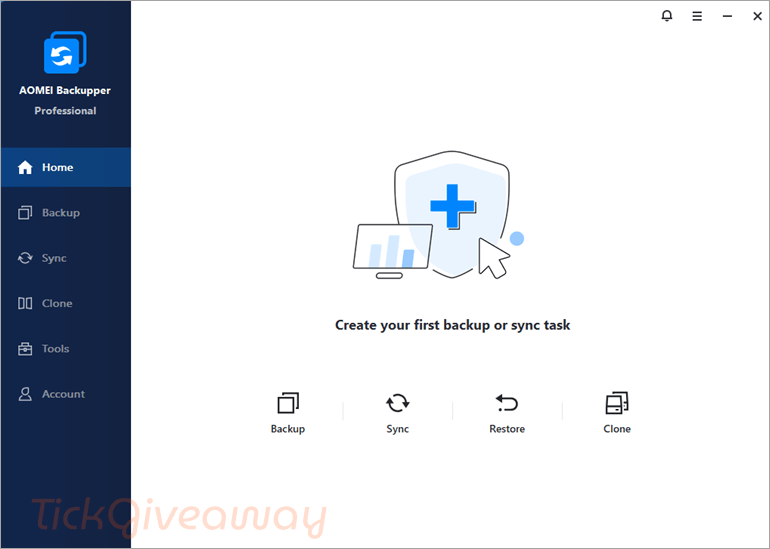
In addition to its core functionalities, AOMEI Backupper Professional offers a range of exceptional features to simplify system backup and restoration. These include Schedule Backup, Backup Scheme, Dissimilar Hardware Restore, Create Bootable Media, Pre/Post Command, Email Notification, Image Management, and Backup Task Management.
Key features
- System Backup & Restore: Create full system images and restore them quickly to ensure business continuity.
- Disk Backup & Restore: Backup entire hard disks, including partitions and data.
- Partition/Volume Backup & Restore: Backup selected partitions or volumes flexibly.
- File/Folder Backup & Restore: Backup specific files and folders with ease.
- Automatic/Scheduled Backup: Set schedules (daily, weekly, monthly, event-based, or USB plug-in) to run backups automatically.
- Incremental & Differential Backup: Save time and space by backing up only changed or new data.
- File Sync: Real-time and scheduled sync between drives, including mirror sync and two-way sync.
- Clone Features: System clone, disk clone, and partition clone to migrate OS or upgrade to SSD without reinstalling.
- Universal Restore: Restore the system to different hardware without compatibility issues.
- PXE Boot Tool: Boot multiple client computers through the network for maintenance or recovery.
- Command Line Backup/Restore: Advanced users can run backups via command-line scripts.
- Compression & Splitting: Reduce image size with compression and split large image files automatically.
- Backup Scheme: Auto-delete old backups to save disk space while keeping recent versions.
- Pre/Post Commands: Run specific programs or scripts before/after a backup task.
- Email Notifications: Get alerts after backup completion or errors.
- Create Bootable Media: Build a WinPE or Linux bootable USB/CD/DVD for system recovery.
- Merge Backup Images: Combine multiple incremental backups into a single image for easier management.
- Dynamic Disk & GPT/UEFI Support: Compatible with advanced disk configurations.
Supported OS: Windows 11/10/8/7
Price: $39.95/1 year
How to get the AOMEI Backupper Professional Giveaway?
Special Offer
AOMEI Summer Sale: Up to 80% OFF
Celebrate Summer Sale 2026 with AOMEI and enjoy savings of up to 80% on trusted backup, partition management, and data recovery solutions for your PC.
AOMEI Backupper Professional - 1Year
AOMEI Backupper Professional (Lifetime Upgrades / 1 PC)
AOMEI Backupper Pro Family (Lifetime Upgrades / 5 PCs)
Instruction
Step 1. Download the giveaway installer
After the download is finished, run the .exe file to install the software.
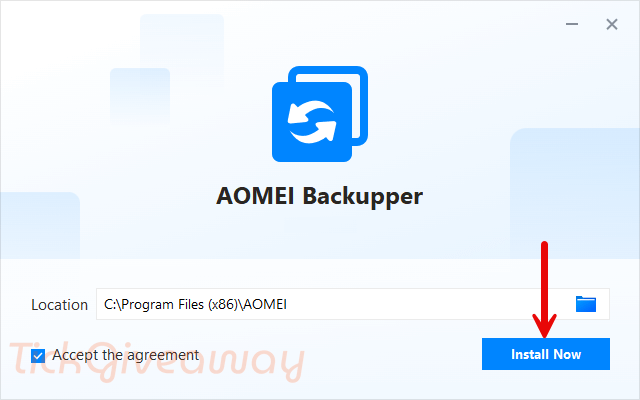
Step 2. Copy and paste the license key to register the software. Use the license code below:
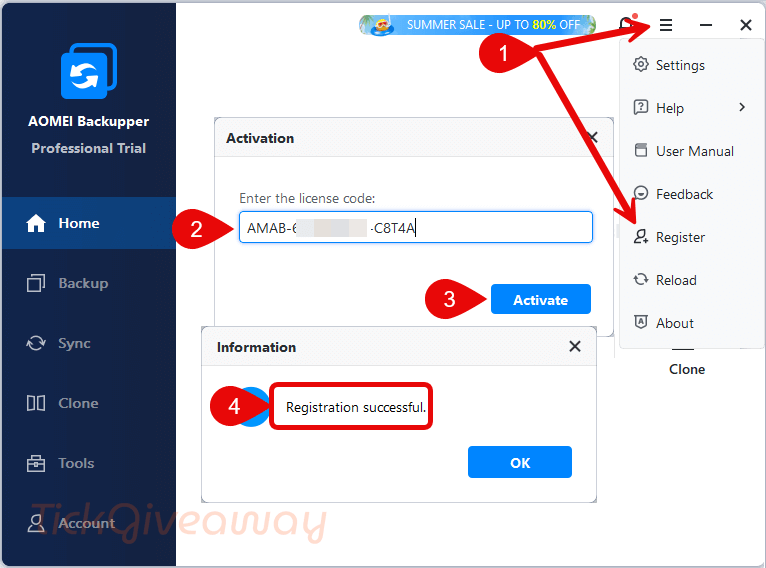
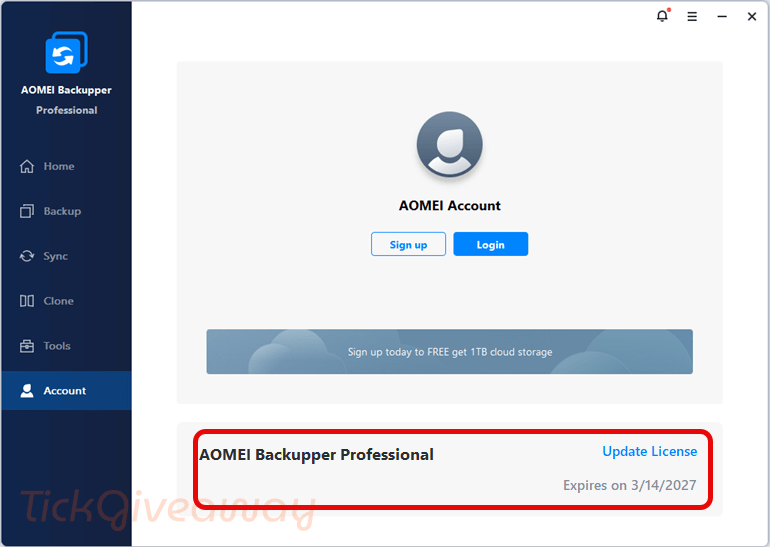
Step 3. Enjoy it for 1 year free!
Step 4. (Optional) Download the installer from AOMEI at https://www.ubackup.com/ss/download/adb/ABProTrial.exe, then reinstall the software on your computer to enjoy the PRO version without the “Computerbild” tag appearing on the interface, and enjoy v8.4.



To be honest I personally use not Pro but Tech Edition… It’s very easy to get it without any crack.
I’m 100% sure if one leaves v8.2.0 CHIP Pro as it is, untouched, with no updating, it will be working as a Pro forever.
Thanks go to user UKENDT, it works, and at the end you got a version 3 pro without ads or Nagscreens. But why the hell so complicated!
I was writing below that don’t recommend to reinstall CHIP giveaway installer by replacing it with the installer from official AOMEI website. CHIP version isn’t self-updatable and I’m afraid if you update it manualy, you will get normal Pro version with 1 year activation period and lose lifetime registration. Anyway that’s up to you.
I’m afraid there is no other possibility than install Chip version 8.20, validate with the serial you supplied and install 8.30 from the Aomei web site.
This will give a one year license, also allowing updating within this year.
As usual, appropriate offers will appear before this license expires 🙂
You can read on CHIP website and .txt file from the link I provided below that this special CHIP Pro version will continue working as usual after 1 year is gone, just will no longer get updates. You can keep updating it but in that case unknown what happens with the software 1 year later, if it remains Pro or not.
Anyone who has troubles with this Giveaway downloads or activation can use direct link from CHIP website:
https://securedl.chip-downloads.de/downloads/110231320/Aomei-Backupper_Pro_Juni2026.zip
Inside the archive you can find special CHIP istaller and activation code in .txt file.
Sorry but I keep receiving this message after entering the key code :
Registration failed. Failed to verify license code , please try again later….
is there a new key available by you ?
Use special installer from CHIP website, you can dounload it here. Don’t use installer from official website.
Thanks
After successful activation you can install version 8.3 from the official website over v8.2 without losing registration.
It’s not version 8.3, but special CHIP-version 8.2 with ads. Anyway, it works, but former giveaway were much better. I changed to Hasleo.
Giveaway has been extended again until June 30, 2026.
New activation Key: AMAB-UXXOD-L9PRT-UNDRJ
doesn’t work on a new install
To be precise.
Install Chip version 8.20 and validate with AMAB-UXXOD-L9PRT-UNDRJ
Retrieve 8.30 fro Aomei and upgrade by installing the new vesrion.
It will work
According to CHIP website Giveaway has been extended until May 31, 2026.
A same Setup ann new License Code: AMAB-PK17N-KL8CQ-NDP3Y
According to CHIP website this is lifetime registration with 1-year update possibility.
https://www.chip.de/downloads/Aomei-Backupper-Pro-Vollversion_165052495.html
I don’t recommend to reinstall CHIP giveaway installer replacing it with the installer from official AOMEI website if you want to keep the software registered after 1 year is gone.
No cloud backup destinations without a local cloud client providing an enumerable folder for ransomware to encrypt makes this product obsolete for the professional and home user alike.
Dear Jasmine
I have entered my email address on the giveaway form but got an invalid key !
is there any help available by you ?
Dear User78,
This license code is valid. Please download the giveaway installer here and try again:
https://dl.tickcoupon.cloud/AOMEIBackupperProTrial_20250828.19115878_TickGiveaway.exe
Thanks
License code failed!
expired all keys.
Hi,
A new giveaway code has been added; make sure to get it before the giveaway ends.
Work! Thx
Bravo ! Si on suit vos instructions, ça fonctionne ! Merci 🙂
License code failed!
We’re excited to share that the new 1-year license code is now available! Don’t miss this opportunity – download the updated version and activate your software today.
Code does not work.
Not working ,, expired all keys..
We’re excited to share that the new 1-year license code is now available! Don’t miss this opportunity – download the updated version and activate your software today.
SERIAL FAILED !
We’re excited to share that the new 1-year license code is now available! Don’t miss this opportunity – download the updated version and activate your software today.
SERIAL FAILED
We’re excited to share that the new 1-year license code is now available! Don’t miss this opportunity – download the updated version and activate your software today.
good
Where do you go in the software to confirm license information? It said the code was updated successfully but nothing like the screenshot where it has the date here. Do I have to create a login and be logged in?