

Giveaway: VidiFab Streaming Video Downloader (6-Month) – Save Streaming Videos Offline

 Leona
Leona What is VidiFab Streaming Video Downloader?
VidiFab Streaming Video Downloader saves movies and TV shows from Netflix, Prime Video, Disney+, Max, Hulu, and Apple TV+ for offline viewing. It can download videos in MP4 or MKV format while keeping selected subtitles, audio tracks, and metadata. The software also supports batch downloads, ad removal, multiple audio languages, and hardware acceleration. You can store downloaded videos on your computer and play them later without relying on each streaming service’s built-in download limits.
Table of Contents
Key Features
- Download from Netflix, Prime Video, Disney+, Max, Hulu, and Apple TV+.
- Save downloaded videos as MP4 or MKV files.
- Queue TV seasons or movie collections for batch downloading.
- Keep selected audio tracks, subtitles, and title metadata.
- Preserve stereo AAC or Surround 5.1 DD+ audio.
- Remove ads during downloads.
- Use hardware acceleration during downloading and conversion.
| Version | 2.0.3 (giveaway build) |
| Supported OS | Windows 10 or later (32-bit & 64-bit) |
| File size | 110 MB |
| License type | 6-month, noncommercial use |
| Publisher | TunesKit |
| Category | Video Downloader |
Our Quick Test
Based on the activation process, the giveaway uses three actions from download to registration. You first get the supplied installer, then open the activation and enter your name with the license code. The supplied instructions do not mention a separate account or web registration step. Registration takes place inside the app using the provided name and code fields. Because updates are excluded, keep the giveaway build installed and skip update prompts. An update may remove the registered state. Free vendor support is also excluded, so activation problems may require self-troubleshooting. This giveaway fits users who can register within the stated window and keep the provided build unchanged.
How to Get the Free License Key
Instructions
Step 1. Download the giveaway installer software for version 2.0.3. When the installation is done, open the activation window.
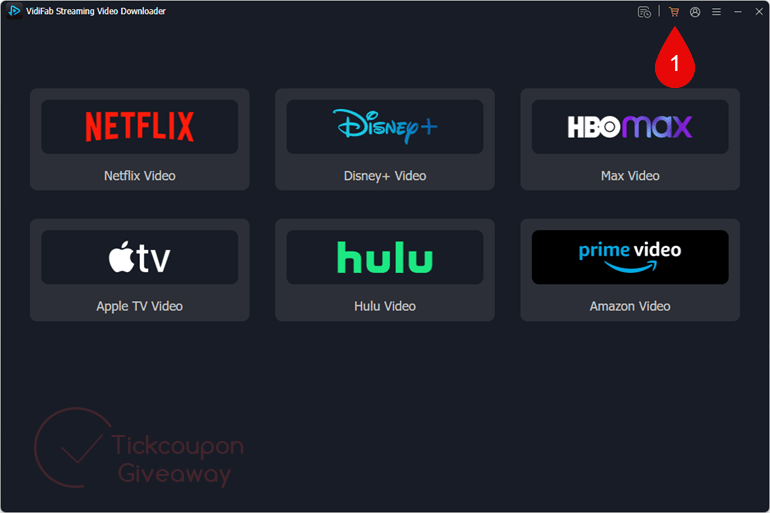
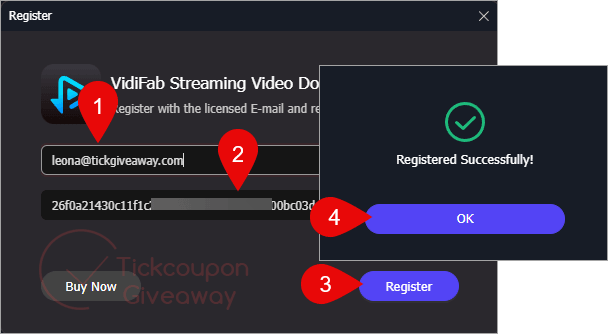
Step 2. Enter your name and license code to activate the app.
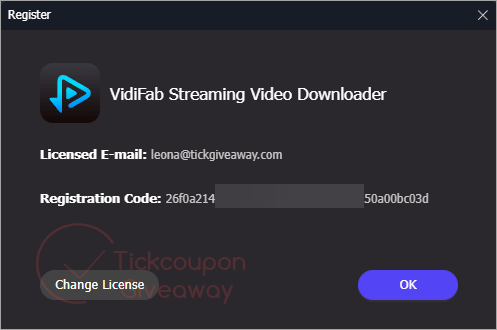
Step 3. Get it for 6 months free!
Troubleshooting
- The key shows as invalid. Use the giveaway installer listed above rather than another build. Reopen the activation window and enter the supplied details again. The default fix is to return to the installer provided for this promotion.
- The giveaway reports that no keys remain. Leave a comment requesting another key. Do not install a newer build while waiting, because the giveaway terms exclude updates.


une belle merde
une belle merde
Installer download link broken as it has long expired. The admin of this site needs to refresh the link.
Error>
ExpiredRequestRequest has expired
/Error>
Also don’t forget this is stealing FFMPEG.ORG intellectual Property by distributing unlicensed FFMPEG.ORG binaries in a closed source product… They could have made this program legally by building LGPLv3 licensed build and given proper attribution and supplied a copy of both GPLv3 and LGPLv3 license that are interrelated. But because their software is built to break contractual agreements and infringe copyright licenses of streaming providers they don’t care about FFMPEG.ORG rights either!
We sincerely apologize for the inconvenience. The download link has now been fixed. You can download VidiFab Streaming Video Downloader and enjoy the free 6-month license. Thank you for your patience!
Dear admin
I used the provided key but received an error message during registration process which says the email and activation key do not match and correct email and activation key should be used , also the exe download link is broken ! Please advise. Thanks
We sincerely apologize for the inconvenience. The download link has now been fixed. You can download VidiFab Streaming Video Downloader and enjoy the free 6-month license. Thank you for your patience!
Please provide serial key to download spotify podcast downloader