

 Leona
Leona What is Erupt Download Manager?
Erupt DM is a Windows download manager built to handle files, videos, torrents, and live streams. It splits downloads into multiple connections, captures media from web pages, resumes interrupted transfers, and refreshes expired download links. The app also supports magnet links, browser extensions, download scheduling, and cross-device file syncing. Its desktop controls let you monitor active tasks, manage queues, and pause or resume downloads without keeping the main window open.
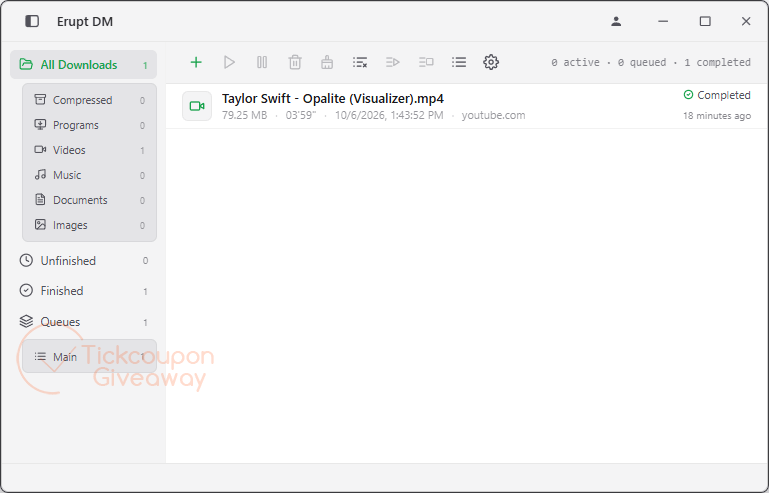
Table of Contents
Key Features
- Splits downloads across parallel connections to increase transfer speeds.
- Captures downloadable media and files through its browser extension.
- Downloads torrent and magnet links through the built-in BT engine.
- Records public livestreams directly to local video files.
- Resumes interrupted transfers instead of restarting them.
- Syncs files, queues, progress, and history between paired devices.
- Downloads streaming video and handles automatic audio and video merging.
| Version | 2.2.1 (giveaway build) |
| Supported OS | Windows 10 / 11 (64-bit) |
| File size | 13.19 MB |
| License type | 1-year license, personal use |
| Publisher | EruptDM |
| Category | EDM AI-Powered Ultra-Fast Download Manager |
Our Quick Test
The supplied system notes require at least 4 GB RAM and 200 MB of free disk space. Activation follows the giveaway workflow: request a code by email, install the supplied build, then enter that code. This license is tied to one PC, so it is unsuitable if you need simultaneous activation on several computers. The one-year term also means continued use afterward requires another valid license. It is worth claiming for frequent Windows downloaders who can work within those limits.
How to Get the Free License Key
Erupt DM
AI-powered download manager for Windows and macOS. Up to 10x faster downloads, 8K video capture, BT magnets, and free cross-device sync.
- License
- 1 Year · 1 PC
- Version
- 2.2.1
- Availability
- Available
Instructions
Step 1. Enter your email address in the giveaway form to request the license code.
Step 2. Download and install the software version 2.2.1 on your computer: https://apps.microsoft.com/detail/xpdfbjgdq515k1?hl=en-US
Open the installed app and log in with your existing account or create a new one if you don’t have one.
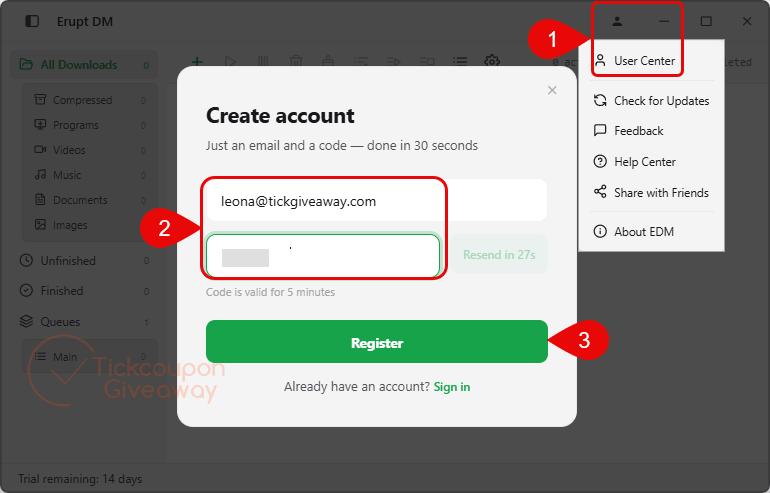
After you log in, copy and paste the license code above to activate the software with full functionality.
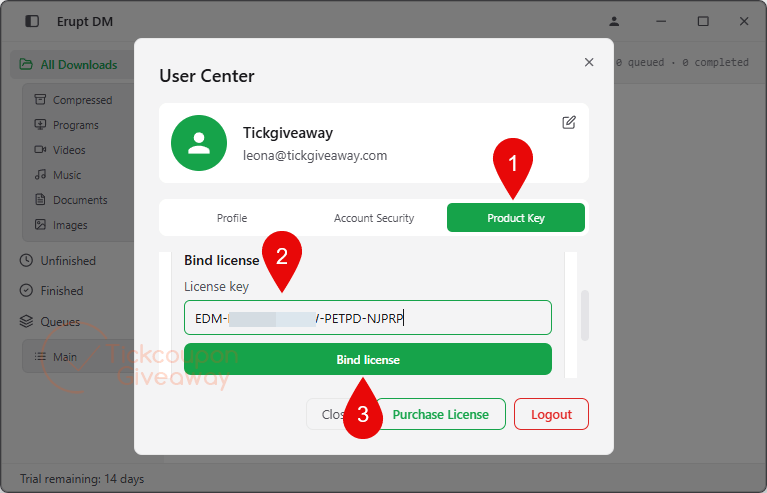
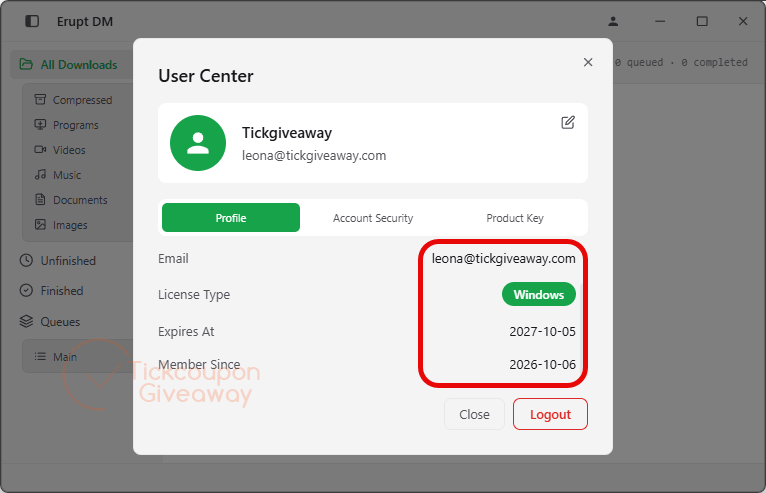
Step 3. Check “User Center” to get the software for 1 year free.
Troubleshooting
- The key is reported as invalid. Make sure you installed the giveaway build named above. Avoid activating a different installer build with this code.
- The giveaway form has stopped issuing keys. Leave a comment on the giveaway page so the key supply can be checked. If the promotion has closed, the discounted plans below are the fallback option.


it contain trojan Name: PDM:Trojan.Win32.Generic
system watcher
Object name: edm-native-host.exe
Hello,
Thanks for reporting this alert. This is a **false positive** from Kaspersky System Watcher.
`edm-native-host.exe` is the official native messaging host helper for EruptDM browser extension. Its only job: receive download links sent from your browser extension, and automatically launch EruptDM main app if EruptDM is not already running. This is standard technology used by download managers like IDM / JDownloader.
Kaspersky PDM (Proactive Defense Module) flags it because the behavior “browser spawns another executable” matches heuristic patterns of trojan downloaders, but the file contains no malicious code.
### How to resolve:
1. Update your Kaspersky virus databases and re-scan. Sometimes newer definitions clear this detection automatically.
2. Restore `edm-native-host.exe` from Kaspersky quarantine.
3. Add the `edm-native-host.exe` or EruptDM installation folder to Kaspersky exclusions / trusted applications list.
We will submit this binary to Kaspersky for false-positive review to reduce future alerts for other users. We are working to mitigate this detection and this issue will be addressed in our next release.
If you have any further questions or other feedback, feel free to let us know.
Doesn’t Ant Downloader pretty much do this as well and is a non-expiring license giveaway? What else does this offer for the 1 year expiring license to make it worth installing, updates for when the youtube downloader stops working and needs fixing?
Thanks for your comment.
We provide continuous app updates. Media download features require regular maintenance because video sites often update their encryption rules.
Ant Downloader is a good competitor, but EruptDM differentiates itself with robust task management, multi-thread file download and cross-device sync.
Your 1-year license includes all feature updates within the license term.
Erupt DM contains no trojans or viruses. We have tested it with multiple antivirus tools on our devices with zero detections. Our macOS build has also passed Apple Notarization, which further proves the safety of this app.
VirusTotal report: https://www.virustotal.com/gui/file/2e64832fb3609a3a859d2f2cee2fa3b156a294f216cfd57987fc8ebf059aef43?nocache=1
Please verify if the SHA‑256 hash matches your downloaded copy of Erupt DM (latest version 2.3.1): 2E64832FB3609A3A859D2F2CEE2FA3B156A294F216CFD57987FC8EBF059AEF43
If you still have safety concerns, please install from Microsoft Store. Free licenses work for this version as well: https://apps.microsoft.com/detail/xpdfbjgdq515k1
Não baixem nem instalem este programa, contém um vírus perigosíssimo. Experimentei instalar em 5 computadores com diferentes antivírus, como Kaspersky Plus, Bitdefender Total Security e Avast, e todos detetaram o mesmo vírus Trojan 32 e pediram para reiniciar o PC para concluir a desinfecção. Esta é uma prova de que temos que ter cuidado com algumas ofertas, ou seja, nem todas as ofertas são bem-vindas.
Obrigado pelo seu comentário. Testámos este programa em vários PCs e funcionou sem problemas. Utilizamos o Sophos Premium para proteger os nossos computadores e não tivemos qualquer alerta.
Se preferir, pode instalar o programa diretamente através da Microsoft Store: https://apps.microsoft.com/detail/xpdfbjgdq515k1
Esta é uma alternativa mais segura para obter a versão oficial.
W32 trojan, included in this download
Thank you for reporting this. Our authentic official installer does **not** contain W32 trojan code.
Unaffiliated third‑party download sites frequently repackage software and bundle malware.
Please double‑check your file source. Always get the installer from our official website and cross‑check the published file hash against this VirusTotal report:
[https://www.virustotal.com/gui/file/1281dfe5bd44171b082ccc96d15366cc92f968fccbe63f27c8f6c9aea857891d](https://link.wtturl.cn/?target=https%3A%2F%2Fwww.virustotal.com%2Fgui%2Ffile%2F1281dfe5bd44171b082ccc96d15366cc92f968fccbe63f27c8f6c9aea857891d&scene=im&aid=582478&lang=zh)