


 Leona
Leona Table of Contents
About XenArmor All-In-One Password Recovery Pro
XenArmor All-In-One Password Recovery Pro is the program you need to recover lost or forgotten passwords from various platforms and applications. This tool, designed to help you recover all your passwords, allows you to retrieve them from over 210 popular Windows apps instantly. You can use it to recover passwords for logging into websites, emails, social media accounts, instant messenger, download managers, FTP accounts, and much more.
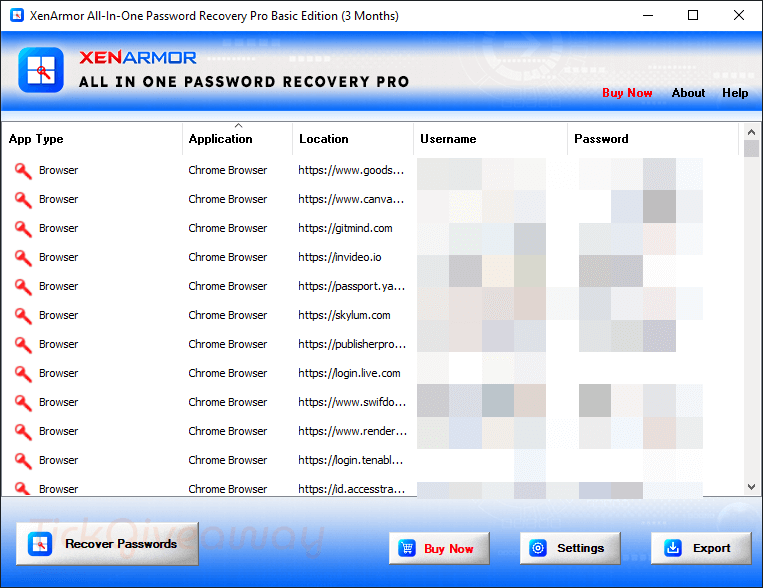
Additionally, it provides a straightforward method for exporting all passwords to a file. All recovered passwords may be saved to an HTML, CSV, XML, JSON, or SQLite file. From Windows XP to the most recent version of Windows 11, XenArmor All-In-One Password Recovery Pro is compatible with both 32-bit and 64-bit platforms.
Key Features
- XenArmor All-In-One Password Recovery Pro instantly recovers passwords from 210+ apps
- “Registry Password Scanner” to find passwords from Registry
- This tool helps you recover Email passwords from 15+ email clients
- You can use it to recover Website passwords from 70+ browsers
- It has the ability to recover FTP passwords from 40+ FTP clients
- This tool can be used to recover DB passwords from 20+ Database Managers
- It provides functionalities to recover Social Network passwords
- The tool integrates an option for recovering Wi-Fi (WEP, WPA, WPA2, WPA3) passwords
- A really nice feature is the ability to recover Windows VPN & Dialup passwords
- It is easy to use with simple UI and helps you recover Passwords from Messengers, Downloaders, Credential Managers, etc
- Auto-recover passwords from All users for Mozilla apps
- Support for Master Password for all Mozilla apps
- Plus, you can also recover from Portable Apps or External Drive
- Also, it designed to recover from both 32-bit & 64-bit apps
- Another excellent thing about the XenArmor All-In-One Password Recovery Pro software is that it allows you to save passwords to HTML, CSV, XML, JSON, and SQLite files.
- Portable Unlimited Edition to run directly from a USB disk (see below)
- This tool supports all Windows PCs (XP to new Windows 11)
Supported OS: Windows Vista/7/8/10/11
Price: $97/lifetime
How to get the XenArmor All-In-One Password Recovery license key for free?
Step 1. Visit the XenArmor All-In-One Password Recovery giveaway page
XenArmor All-In-One Password Recovery Pro Basic Coupon Code
XenArmor All-In-One Password Recovery Pro Premium Coupon Code
After you type in your email address and press the “REQUEST FULL VERSION KEY” button, you will receive an XenArmor All-In-One Password Recovery license key like the one in the image below.


Step 2. Download and install the software on your computer —> AllInOnePasswordRecoveryPro_Giveaway_2025.zip
Register it with the above license to get full functionality
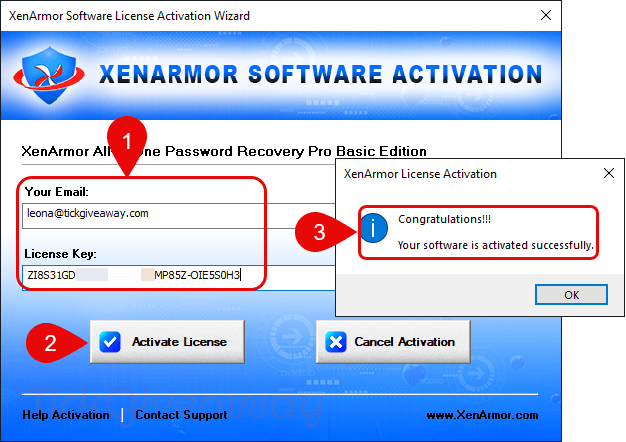
Step 3. Enjoy it for 6-month free

Terms & Conditions
- This is a 6-month license
- No free technical support
- No free upgrades to future versions
- Strictly non-commercial usage
- Promotion Period: Ends soon!





3 month license is not a giveaway but a trial AND this is the limited BASIC edition not the Premium or Unlimited editions and is significantly limited with NONE of the advanced features listed in the comparison matrix. The license you buy is a lifetime license they do not sell expiring license.
xenarmor.com/order-software/?productid=5501
this is still a never sold expiring trial license of the limited basic edition. In addition this is not a password recovery program it a password extraction program for a limited number of programs and guesses at the rest often providing non-password data and unusable data… It does not recover lost passwords from encrypted archives and documents or programs it knows nothing about and does not recover the passphrase from vovsofts hide files.
Win Defender deletes this file for having a virus
Giveaway period ended Nov 2024