

Giveaway: Video Watermark Pro (Lifetime) – Add Watermark to Protect Your Video Copyright

 january
 Table of Contents
What is Video Watermark Pro?
Video Watermark Pro software is probably the best choice for protecting your video copyright. Using the software, you can easily add a watermark (text/image/animated GIF/…) to a video to prevent unauthorized use and confirm ownership. The software works smoothly on almost all video formats, such as AVI, MP4, FLV, MOV, MPG, SWF, etc.
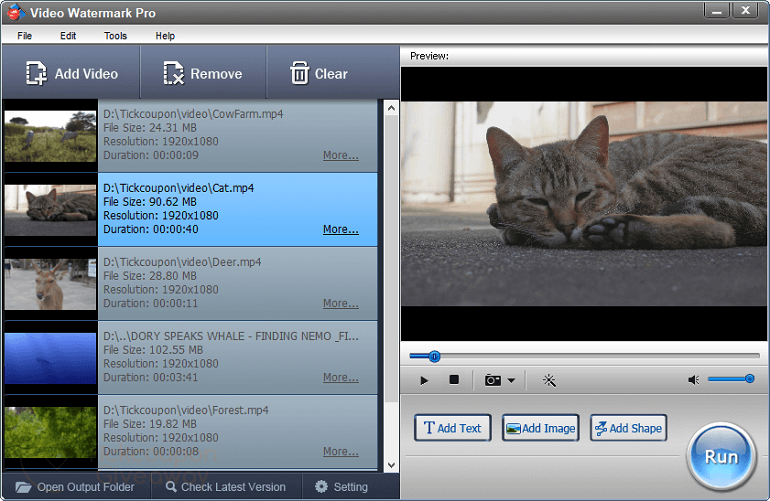
Beyond a watermark tool, Video Watermark Pro is also a professional video converter. It helps you convert videos into different formats, such as HD MKV, HD TS, HD TRP, HD AVI, HD MP4, HD MPG, HD WMV, HD MOV, ASF, MOV, M4V, MP4-AVC, etc. Before converting, you can customize the output settings, video settings, audio settings, and subtitles.
Key Features
- Add a watermark (text/image/animated GIF/…) to the video
- Add the customized graphic model/shade to the video
- Batch watermarking hundreds of videos at once
- Timeline – control the time period, animation, etc
- Multiple editing functions and unique effects
- 100+ free image watermark materials
- Convert videos to various formats
- Capture snapshots from the video
- Create layer concept like Adobe Photoshop’s layer
- User-friendly interface
Supported OS: Windows 11/10/8/8.1/7
Price: $69.95
How to get the Video Watermark Pro license key for free?
Special Offer
Video Watermark Pro
Instructions
Step 1. Download and install the software on your computer.
Step 2. Register with your name and the license key.
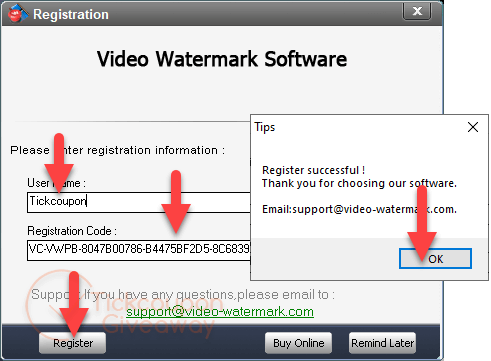
Step 3. Enjoy it!





expired