

Tatasoft Disk Clone Key Free – Clone An Entire HDD or SSD to Another

 Leona
Leona Tatasoft Disk Clone is a Windows disk-cloning tool designed to help users copy a hard drive or partition to another storage device with minimal manual effort. It can be used to migrate Windows to a new SSD, replace an old drive, create a full backup, or clone selected partitions as needed. The software also supports sector-by-sector cloning for users who need an exact copy of the original disk. Overall, Tatasoft Disk Clone is aimed at people who want a more direct way to move their system, files, and data without reinstalling Windows or starting over.

Table of Contents
What Does Tatasoft Disk Clone Help You Do?
- Move Windows, installed programs, and files from one drive to another.
- Replace an HDD with an SSD without reinstalling the operating system.
- Create a full copy of a disk or selected partition for backup or migration.
- Make a sector-by-sector clone when an exact 1:1 copy is needed.
- Adjust the destination disk layout during cloning.
- Prepare a bootable copy of a system disk for recovery or transfer purposes.
Tatasoft Disk Clone Giveaway Details & How to Join
Giveaway Overview
| Version included | 3.0 for Windows |
| License type | Full lifetime license |
| License duration | Lifetime, as provided in this promotion |
| Supported platform | Windows 11/10/8.1/8/7/Vista Windows Server 2022/2019/2016/2012 R2/2012/2008 R2/2008/2003 R2/2003 |
| Usage limit | Strictly non-commercial use |
| Technical support | No free technical support |
| Future upgrades | No free upgrades to future versions |
| Original price | $69.95 |
How to Join
Step 1. Download the installer for Tatasoft Disk Clone version 3.0 —> TatasoftDiskClone.exe
Install the program on your Windows computer.
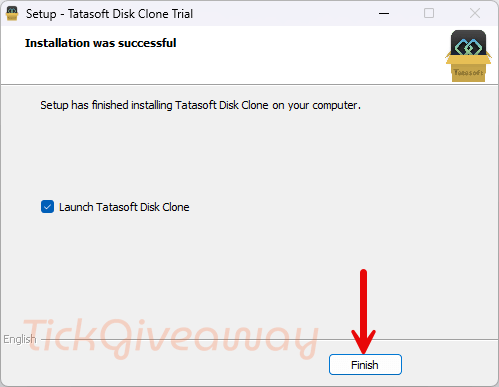
Step 2. Activate it using the license code below
License code
DoYourClone for Windows Lifetime License
50% off coupon code
Hasleo Disk Clone Professional + Lifetime Free Upgrades
42% Off Hasleo Disk Clone Professional + Lifetime Free Upgrades
30% Off AOMEI Cloner Professional (Lifetime/ 1 Computer) Coupon Code
Get 50% Off EaseUS Disk Copy Professional (Lifetime Upgrades) Discount Code
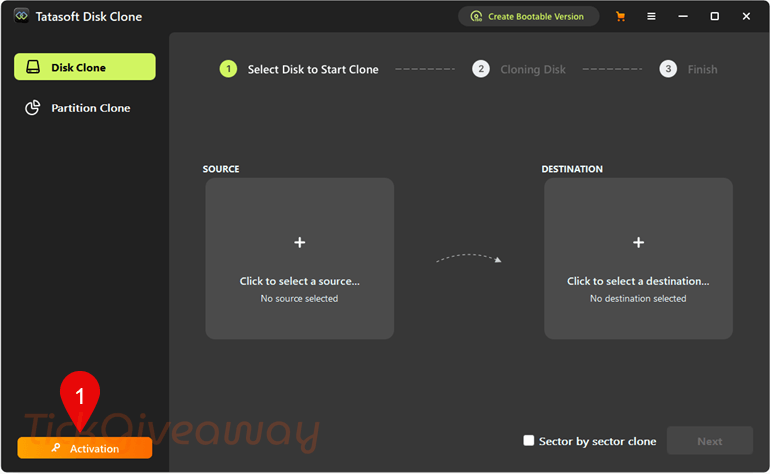
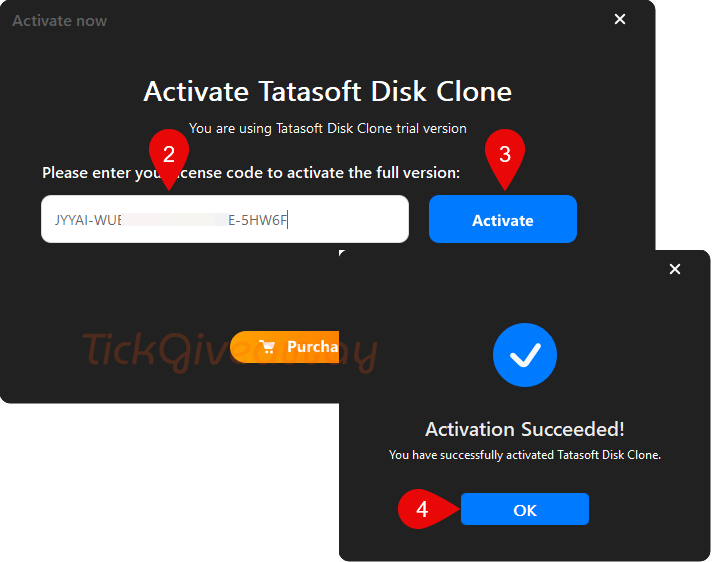
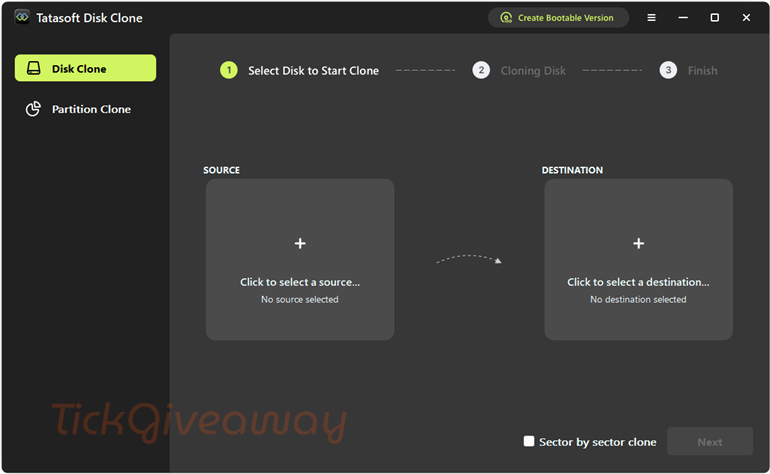
Step 3. Start using the software for life, free with full functionality.
Who Is This Giveaway Most Useful For?
- Users are replacing an old system drive with a newer SSD while keeping their current Windows setup.
- People move data from one PC drive to another without copying files manually.
- Anyone preparing a backup drive before hardware replacement or troubleshooting.
- Users who need to clone a specific partition for transfer or backup.
- People who want to make an exact copy of a disk before changing storage hardware.
Terms & Conditions
- The giveaway includes a lifetime license for version 3.0 for Windows.
- The license is intended for non-commercial use only.
- Free upgrades to future versions are not included.
- Free technical support is not included.
- Activation requires the license code supplied with the promotion.
- The terms apply to the version offered in this giveaway, not necessarily later releases.
- Cloning results may depend on destination disk size and the cloning mode selected.
- Users should review the organizer’s instructions carefully before installation and activation.
Common Questions About This Giveaway
What can I use Tatasoft Disk Clone for?
It is intended for disk migration, system transfer, partition cloning, and creating full copies of storage devices in supported Windows environments.
Does the giveaway include future updates?
No. Free upgrades to future versions are not included with this promotion.
Can I use this license for business purposes?
No. The giveaway license is marked for strictly non-commercial usage.


according to virustotal.com there is malware
https://www.virustotal.com/gui/file/d23cd29eef30e1bef53aa1121701aad3ecfa4432a5f85993d66e33be34d0eaec
The vendors site states:
“Operating System Supported:
Windows 11/10/8.1/8/7/Vista
Windows Server 2022/2019/2016/2012 R2/2012/2008 R2/2008/2003 R2/2003”
This website states:
“Supported platform Windows 11, 10, 8.1, 8, 7, and Windows Server editions listed by the developer”
Which is more accurate?
It failed to create a bootable ISO file under Vista but the main program executed and activated just fine… got no suitable drives to test the fault tolerance or full functionality with tho. Too many unknowns to install under Win10
Is the cloning process fault tolerant i.e. can you clone a failing drive to a new good drive and let windows fix any files later with a refresh restore operation? Or will it fail the clone operation on first sector read error and prove to be useless in that circumstance?