

 Leona
Leona Table of Contents
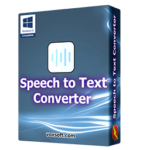
What is the Vovsoft Speech to Text Converter?
Vovsoft Speech to Text Converter is a speech conversion software that helps you convert audio into text. With support for over 50 languages, including English, Spanish, French, Arabic, Brazilian Portuguese, Japanese, Korean, German, Mandarin, and others, it can effectively handle diverse linguistic needs. This software can save you hours transcribing interviews, meetings, podcasts, or any long audio files. Vovsoft Speech to Text Converter can handle a wide range of media types, from popular audio formats like MP3, FLAC, and WAV to video files like MP4, MOV, and MKV.

Key Features
- Instantly converts audio and video into text, eliminating the need for tedious manual transcription and freeing up your valuable time.
- Works with a wide range of audio (MP3, WAV, M4A) and video (MP4, AVI, MKV) formats, making it a versatile tool for any project.
- Utilizing advanced artificial intelligence, Vovsoft delivers highly accurate transcripts in over 50 languages, with the ability to switch language profiles for improved results.
- Easily convert existing audio/video files or use your microphone to record and transcribe new content directly within the application.
- Designed for both professionals and home users, this AI-powered tool offers a straightforward interface for converting voice to text with ease.
Supported OS: Windows 11/10/8.1/8/7 (32-bit and 64-bit)
Price: $19/lifetime
How to get the Speech to Text Converter license key for free?
Step 1. Download the installer for Speech to Text Converter version 5.5 –>
speech-to-text-converter.exe speech-to-text-converter-portable.zip
Install it:
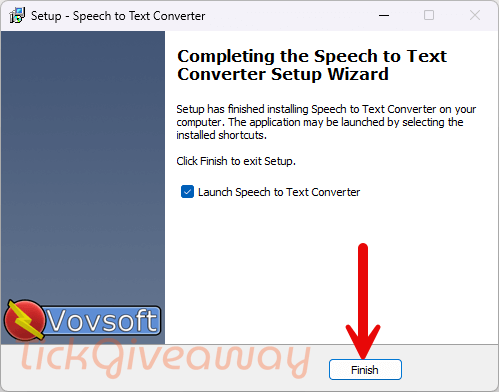
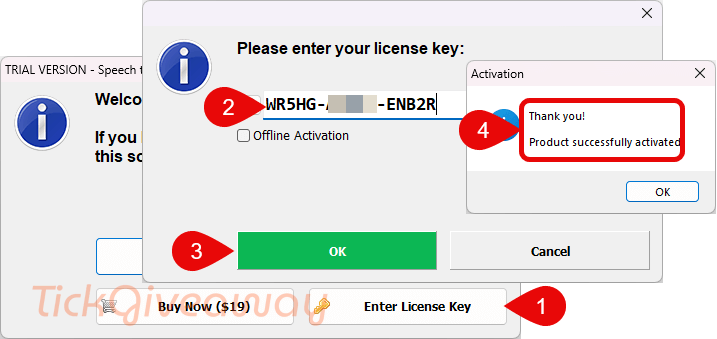
Step 2. Launch the Speech to Text Converter on your computer and use your license code to register the software
30% Off Vovsoft Speech to Text Converter coupon code
98% Off Vovsoft Universal License lifetime coupon
Step 3. Enjoy it!

Terms & Conditions
- This is a 1-computer lifetime license for v5.5
- No free updates
- No free tech support
- You must download and install the giveaway before this offer ends (register before May 10, 2026)


There appears to be no editing in continuos dictation mode which uses windows built in voice recognition… but does NOT use windows built in editing… so it’s not value added to the built in free dictation system which does include voice editing! Plus all the Vosk offline models are US English there are no ENGLISH English language data files! And Vosk offline model accepts many media types BUT converts them to an uncompressed temporary WAV file which can end up as MASSIVE as it uses a legal LGPLv3 licensed copy of FFMPEG.EXE to do the media conversion… thankfully it does delete the WAV file upon completion but wouldn’t it be more efficient to buffer the WAV in RAM and keep it for changing the Vosk model as the default vosk model is tiny and not accurate even with Texan vocals which I believe is US English… and there are a few different US English models that can be downloaded and installed… as is it has to reconvert and re-write hundreds of megabytes of temp WAV file for each attempt to convert and see which model works best. I also did a test with an English language file and selected the French language model and it took ages to process the same file to the point I had to end the main programs task and the voskrunner.exe single threaded process continued in the background consuming one CPU logical cores worth of power and it had to be manually end task in task manager, I not the User interface becomes completely unresponsive while performing a Vosk based conversion… so it’s spawning the voskrunner.exe incorrectly making the spawned process 100% blocking until it’s completed successfully which may never happen in some circumstances.