
PC Services Optimizer Pro Key Free – Speed up your PC and Boost Performance

 Leona
Leona PC Services Optimizer Pro from Smart PC Utilities is designed to help you optimize your PC’s performance and speed up its operation. This PC optimization software offers both automatic and manual tune-up modes, allowing you to adjust unnecessary services according to your usage patterns, thereby optimizing resource utilization without compromising system stability.
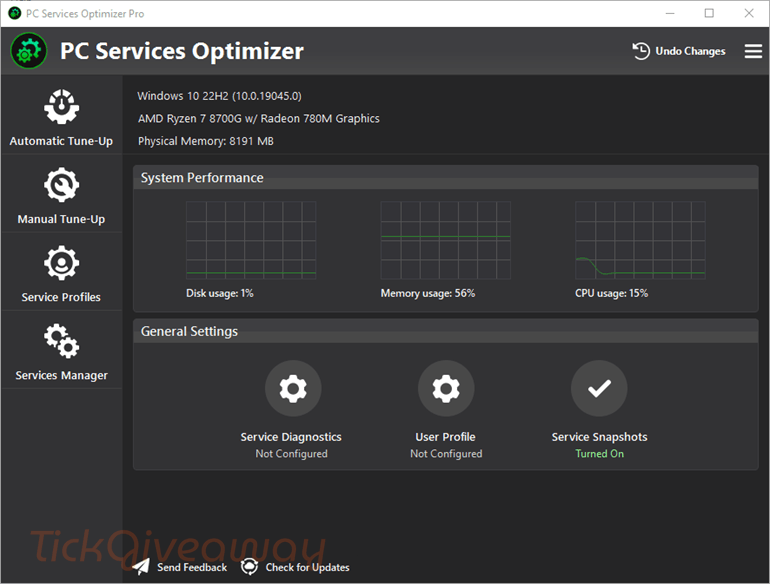
Without requiring deep technical knowledge, PC Services Optimizer Pro is suitable for both beginners and advanced users, helping you switch configurations to match specific scenarios, such as gaming or work. The Rescue Center feature is included in this tool to create restore points and allows you to undo any changes, even those made by other software, affecting your service startup settings.
Table of Contents
What Does PC Services Optimizer Pro Help You Do?
- Helps reduce background services that may not be needed for everyday use, which can improve system responsiveness and reduce resource usage.
- Adjusts service settings based on how the computer is used, making it easier for regular users to optimize Windows without manual configuration.
- Gives more experienced users additional control over Windows services, including deeper customization options for system tuning.
- Allows users to manage and optimize services related to installed applications, not just built-in Windows services.
- Lets users save different service setups for specific situations, which is useful for switching between work, daily use, or other custom PC setups.
- Includes tools to back up current service settings and restore them later if changes need to be reversed.
- Provides a safety feature for undoing service-related changes, helping users recover previous configurations when needed.
PC Services Optimizer Pro Giveaway Details & How to Join
Giveaway Overview
| Version included | v5.0 |
| License type | Pro license for 1 PC |
| License duration | 1 year |
| Supported platform | Windows 11, Windows 10, and Windows 8.1 |
| Additional requirement | Microsoft .NET Framework 4.8 |
| Original price | $31.58 |
| Updates | Free updates are included during the license period |
| Tech support | No free technical support |
How to Join
Step 1. Visit the PC Services Optimizer Pro giveaway page
85% Off PC Services Optimizer 5 PRO (Special Offer)
67% Off PC Services Optimizer 5 PRO - 1 Year/1PC Coupon Code
46% Off PC Services Optimizer 5 PRO - 1 Year/3PCs Coupon Code
88% Off PC Services Optimizer 5 PRO - 2 Year/ 1 PC Coupon Code
61% Off PC Services Optimizer 5 PRO - Lifetime/1PC Coupon Code
33% Off PC Services Optimizer 5 PRO - Lifetime/ 3 PCs Coupon Code
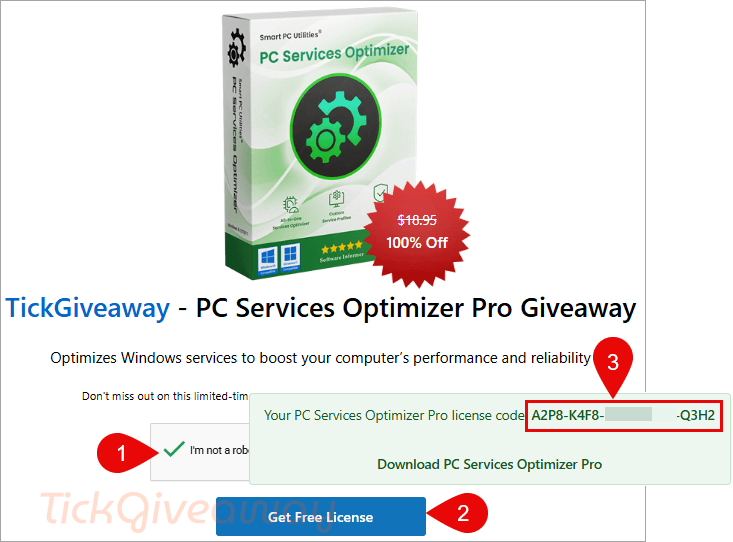
Complete the captcha and then click on the “Get Free License” button to get your free license code
Step 2. Download the installer here –> servicesoptimizer.exe
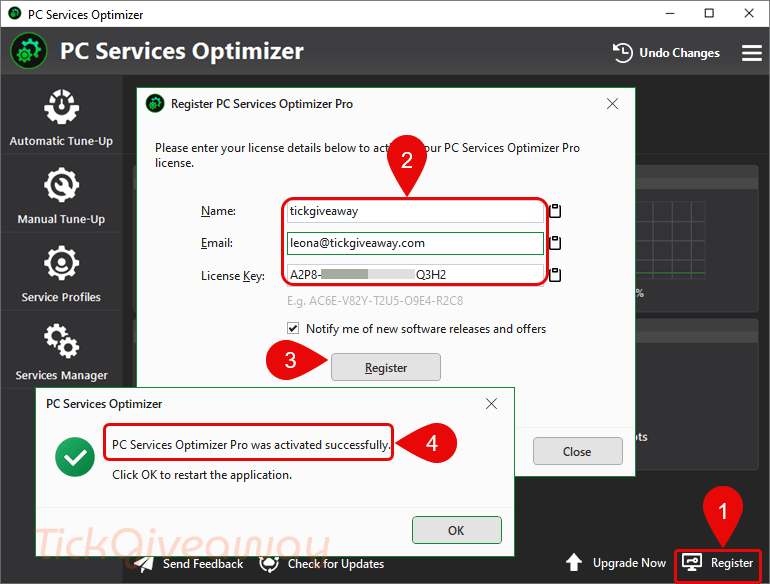
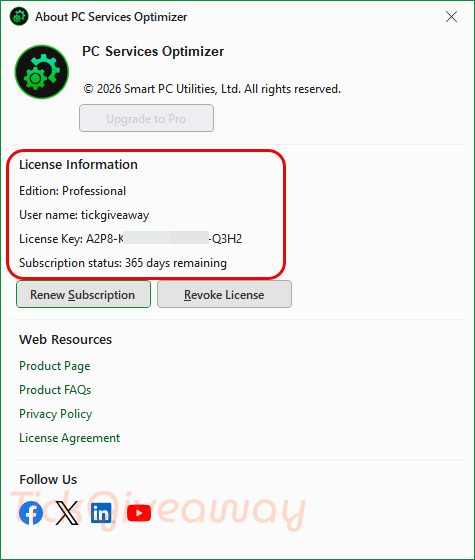
Install the software on your computer. Please enter your license details (name, email & license key) to activate the software.
Step 3. Enjoy it for 1 year free!
Who Is This Giveaway Most Useful For?
This giveaway is most useful for people whose Windows computers slow down over time and who want a simpler way to review background services. It can also help users who like to fine-tune their system for work, browsing, or everyday use without editing service settings individually.
It may also suit more experienced users who want to create separate service profiles for different scenarios, such as a lighter setup for routine tasks or a customized setup for a specific workflow. Another good fit is someone who wants a recovery option before changing service settings, especially if they are cautious about making system-level adjustments.
Terms & Conditions
- The giveaway includes PC Services Optimizer Pro version 5.0.
- The license is valid for 1 PC only.
- The free license lasts for 1 year.
- Free updates are included during the active license period.
- Free technical support is not included with this offer.
- Activation requires license details during setup.
- Use is limited to the conditions stated by the organizer.
- Availability may end once the promotion period closes.
- The campaign will run until March 14, 2026.


the key was send by email. But i ghave already delete this Program need no more serials 🙂
Using now Kerish pc Doctor full version
I’ve been testing the service profiles feature; it’s brilliant! I created separate setups for gaming and productivity, and switching between them is seamless. Definitely a smart way to optimize performance without manual tweaking.
Just got my free license, thank you TickGiveaway! PC Services Optimizer Pro is exactly what I needed to clean up my system. The automatic mode is super convenient, and I love that!
3x insert Register key = 3 x fail ! Delete the Program ! Thanx
What are the license keys you registered?