

Giveaway: Privacy Protector for Windows 11 – Windows 11 Privacy Tool

 jasmine
 Table of Contents
What is the Privacy Protector for Windows 11?
Need a great privacy protection solution for Windows 11, Privacy Protector for Windows 11 is the best choice. Privacy Protector for Windows 11 helps to cope with privacy problems in this OS. There are numerous services in Windows 11 that collect private users’ data of all possible kinds. This software tool helps to solve all Windows 11 privacy issues that violate the right of every user for confidential activity on his PC. The program is oriented both for private users and companies with exclusive standards of data confidentiality.
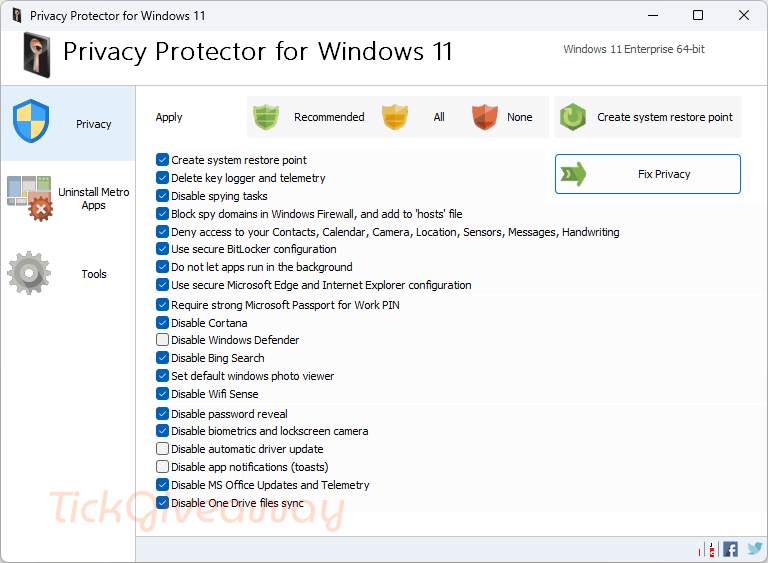
By means of a simple-to-use interface, a Privacy protector user can tune his system to block unwanted traffic to Microsoft servers. It is possible to delete certain elements of the Telemetry and Data Collection system while the rest is simply disabled. A user is able to act at his own discretion choosing the services for disabling to eliminate specific Windows 11 privacy concerns. There are about 40 services (some of them work in the background) for tracking and collecting personal user data. It is possible to delete, disable or block the following tools:
- Cortana
- Office Telemetry
- Media Center
- Power Efficiency Diagnostics
- Customer Experience Improvement Program
- Windows Search
Key Features
- Deletes or disables Telemetry
- Clears and disables DiagTrack Log
- Disables Keylogger, preventing data collection from characters typed on your keyboard
- Disables Windows Defender
- Disables Cortana to prevent data collection from your microphone and webcam
- Disables Windows Update, allowing you to block unwanted updates
- Selectively rolls back certain Windows Updates enabling tracking features (for Windows 11, 10, 8.1, 8, and Windows 7)
- Disables certain Telemetry and tracking modules in Microsoft Office
- Optionally blocks Microsoft Office updates
- Allows reinstalling Windows 7-8 Picture Viewer
- Enables users to uninstall OneDrive
- Enables disabling Bing Search
Supported OS: Windows 11/10/8/7/Vista
Price: $18.99/ lifetime
How to get the Privacy Protector for Windows 11 full version?
Special Offer
Get deal for PrivacyScan - 1 Computer
Buy it now
iolo Privacy Guardian - 1 Year
WinZip Privacy Protector
Solvusoft WinSweeper
Instructions
Step 1. Download and install the software on your computer.

Step 2. Please copy and paste the free license key to activate the software.
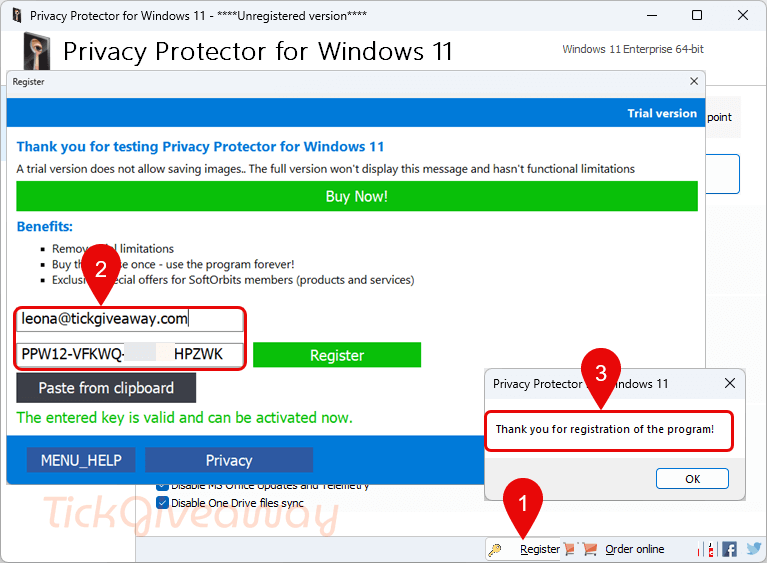
Step 3. Now, you can enjoy the full version of Privacy Protector for Windows 11 for a lifetime!


WARNING Softorbits DO NOT RESPECT THE INTEGRITY OF YOUR SYSTEMS. They build their programs and installers to bypass admin protections on program installation to allow non-admins like children and employees to install programs when they are not authorised or allowed to install unauthorised programs. They FORCE installation to the system drive, and force installation into an insecure folder hierarchy in the user AppData folders subfolder which is not write protected against non-elevated malware. I do not recommend the installation of products by such a self-serving malicious developer on your machines.
Ironically this developer insists on packaging their programs to allow non-admins and non-admins without access to an admin identity to install their programs in an unauthorised manner yet this program REQUIRES Admin Elevated rights to run! It has to or it couldn’t cripple windows in the name of privacy!
This site merely offers software of questionable value that fails to gain recognition in the market. People reject these software products, refusing to purchase or install them on their PCs. The site offers these subpar software items as giveaways, rather than providing valuable software for distribution. Therefore, I recommend refraining from obtaining such low-quality software from this site.
sorry, cannot recommend.
This program totally ruined my clean install of windows. it negated my biometric reader and messed my pin up so i had to type a new pin. it blocks fingerprint readers, and has also reduced compatability with alot of programs, especially when it grinds your system to a halt.
there are better ones around, i just cannot recommend this one
Offer is expired
You can use the Ashampoo WinOptimizer: https://giveaway.tickcoupon.com/ashampoo-winoptimizer-license-free/
This software is a powerful optimization software and also offers the privacy protector function.
I will try it, thank you
Offer is expired…
Thanks for the feedback.