
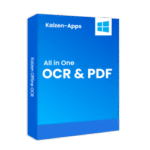
Kaizen OCR & PDF Free License Giveaway – Extract Text from Images & PDFs

 january
 Struggling to copy text from scanned documents, images, or locked PDF files? Manually retyping content can be time-consuming and error-prone, especially when dealing with receipts, contracts, screenshots, or multilingual documents. A desktop OCR tool can simplify this process by converting images and PDFs into editable text while keeping your files private. Kaizen OCR & PDF is designed for Windows users who need offline text extraction and PDF management in one place. A 1-year free license is currently available through this giveaway, allowing eligible users to access the full version at no cost.

Table of Contents
What Does Kaizen OCR & PDF Help You Do?
- Extract editable text from images such as photos, receipts, and screenshots
- Convert scanned PDFs into searchable and selectable documents
- Capture text directly from your screen using a built-in snipping tool
- Merge, split, and reorganize PDF pages for easier document handling
- Add or remove passwords to control access to PDF files
- Convert documents and images between multiple supported file formats
Kaizen OCR & PDF Giveaway Details & How to Join
Giveaway Overview
| Version included | Full version of Kaizen OCR & PDF |
| License type | Free promotional license |
| License duration | 1 year |
| Supported platform | Windows |
| Original price | $21.0 |
How to Join
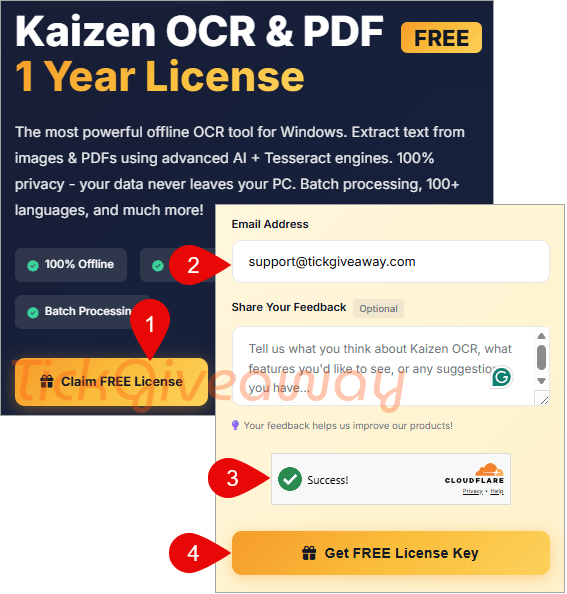
Step 1. Visit the official giveaway page: https://kaizen-apps.com/giveaway-ocr.html
Enter your email to request a free key:
Cisdem OCRWizard for Windows – Lifetime/1 PC
20% off coupon code
EaseText Image to Text Converter for Windows (Personal Edition)
36% off coupon code
A-PDF OCR
5% off coupon code
Readiris Pro 17 for Windows (PDF and OCR Software)
49% off coupon code
Check your mailbox for the download link and license code:

Step 2. Download the Kaizen OCR & PDF installer for Windows: KaizenOcrInstaller.exe
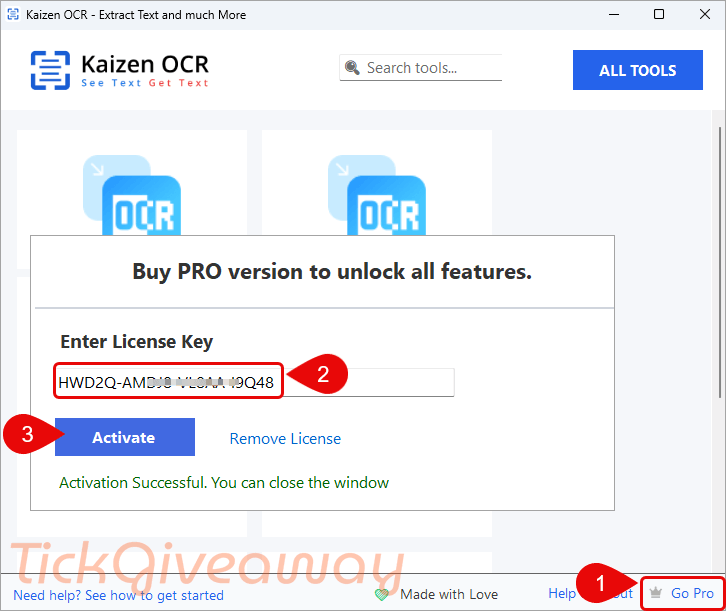
Install this software on your PC then enter your details to get started:

Step 3. Follow the instructions provided to activate the 1-year license before the deadline:
Who Is This Giveaway Most Useful For?
- Students who need to extract notes or text from scanned study materials
- Office workers handling contracts, invoices, or multilingual documents
- Researchers collecting data from PDF reports or archived scans
- Anyone who prefers offline tools for privacy-sensitive documents
Terms & Conditions
- License is valid for 1 year from activation
- Activation must be completed before March 1, 2026
- No free upgrades to newer major versions are included.
Common Questions About This Giveaway
Do I need an internet connection to use the software?
The software operates offline, but activation may require an internet connection.
Will I receive future updates?
The promotion does not include upgrades to new major versions.
Can I activate after March 1, 2026?
No. The license must be activated before the stated deadline.


Does it convert a scanned to PDF to a searchable PDF with the text layer added by OCR process or does it just extract any text it can OCR to a dumb unformatted TXT file or an RTF file?
Let’s try it and see how it works in your case 😊
It just exports unformatted text to a txt file and the AI only uses CPU no GPU acceleration nothing else and mistakenly detects tables with multiple columns of text. Uninstalled