

iBeesoft Disk Partition Wizard Key Free – Manage/Clone Discs and Convert File Systems

 Leona
Leona Table of Contents
What is iBeesoft Disk Partition Wizard?
iBeesoft Disk Partition Wizard is an all-in-one disk management software that combines flexibility, speed, and reliability, offering over 40 advanced tools to handle partitions, disks, file systems, and operating systems with ease. With its help, you can create and resize partitions without data loss, clone entire drives, recover lost data, rebuild MBR, and even migrate your OS. iBeesoft Disk Partition Wizard is your trusted selection for smarter, safer, and faster disk management, whether you’re upgrading hardware, troubleshooting boot issues, or simply organizing your storage more efficiently.
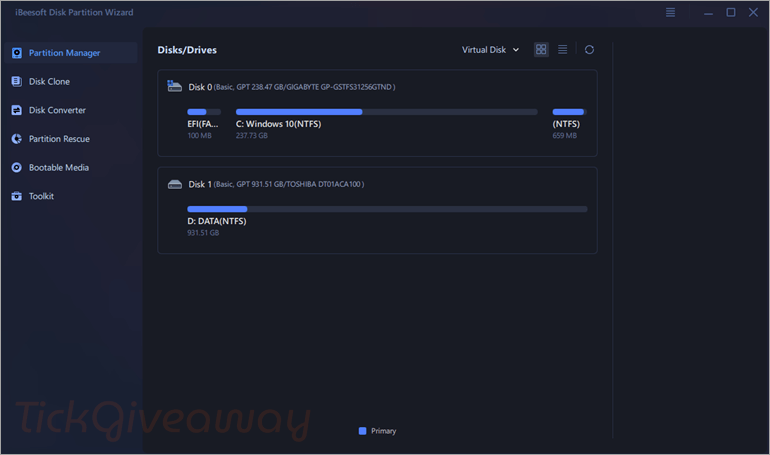
Key Features
- Adjust partition sizes without losing data.
- Combine small partitions or split large ones with ease.
- Reallocate space across partitions, including system drives.
- Optimize storage units for better performance.
- Clone the entire system disk, including Windows OS and programs, to another disk.
- Clone a pure data disk or copy data from one partition to another.
- Convert FAT to NTFS for advanced security or FAT to exFAT for large file support and cross-platform use.
- Recover lost or accidentally deleted partitions.
- Repair partitions that are damaged or turned RAW.
- Create bootable USB/DVD/CD media based on WinPE for recovery.
- Add WinPE startup options directly to the boot menu.
- Download and burn Windows ISO files to USB drives or CDs.
- Move applications and data from the C: drive to other disks to free up space.
- Monitor disk health and get guidance for maintenance.
- Rebuild MBR to fix boot errors caused by corruption.
- Enable or disable write protection safely.
- Use 4K Alignment to improve disk read/write speed and extend lifespan.
- Retrieve BitLocker recovery keys via local search or Microsoft account.
- Create a bootable USB drive to reset or clear forgotten Windows passwords.
Supported OS: Windows 11, 10, 8, 7, Vista, XP and Server
Price: $39.95/year
How to get the iBeesoft Disk Partition Wizard license key for free?
Step 1. Please enter your email address and click on the “Free Get License” button on the iBeesoft Disk Partition Wizard giveaway page
AOMEI Partition Assistant Professional (Lifetime Upgrades / 2 PCs)
50% Off EaseUS Partition Master Professional (Lifetime Upgrades)
20% Off MiniTool Partition Wizard Pro - Ultimate License Coupon Code
65% Off PassFab 4EasyPartition Lifetime Discount Code
65% Off Tenorshare 4DDiG Partition Manager – Lifetime Coupon
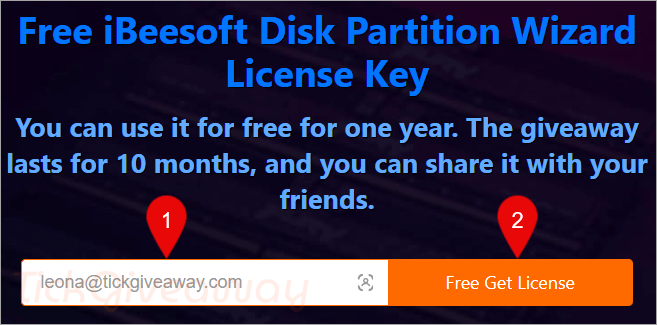
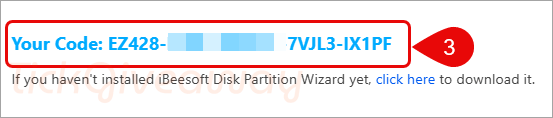
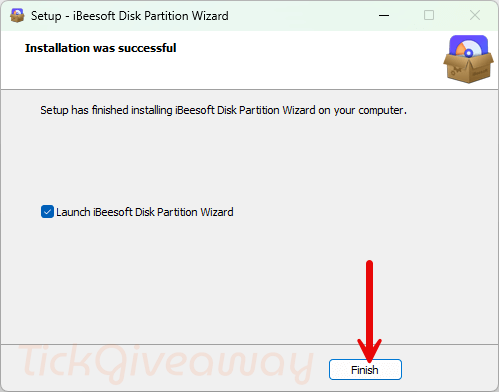
Step 2. Download and install the software on your computer —> iBeesoft-Disk-Partition-Wizard.exe
Copy and paste the license code to activate the software.
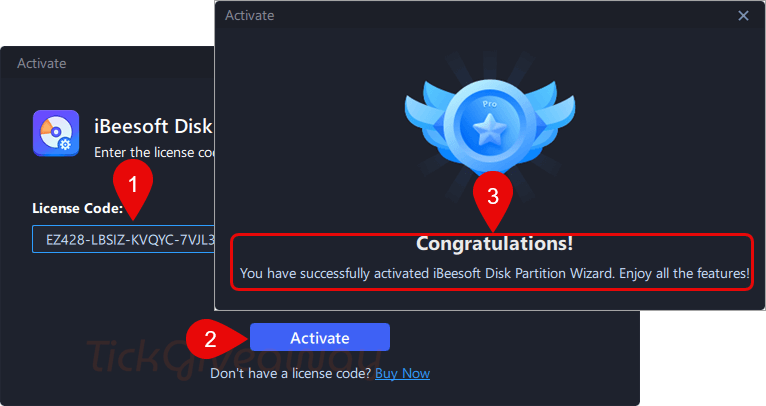
Step 3. Enjoy it for 1-year free with full functions.
Terms & Conditions
- This is a 1-year license
- Non-commercial usage
- No free updates and tech support


this giveaway claims:
“Supported OS: Windows 11, 10, 8, 7, Vista, XP and Server”
BUT the installer is built to NEED windows NT 6.1 or above so it CANNOT be installed under Vista or XP with the supplied installer. The giveaway also does not support server editions of windows, only the “Server” license edition supports windows server systems. Also most of the executables including the main UI are 64bit executables so it WILL NOT RUN ON 32BIT editions of Windows Vista to 10 (it is possible to extract the installer contents and manually install it under 64bit Vista but I wouldn’t as the inconsistent information, typos on their site calling GPT partitions “GTP”
“Convert disk (Dynamic Basic, MBR GTP)”
indicates a complete lack of quality control in the supply chain. The installer was built with inno setup version 6.3.0 which is why it is built for NT 6.1 or above and oddly they include in the installer script the lines:
“ArchitecturesAllowed=x64 arm64
ArchitecturesInstallIn64BitMode=x64 arm64”
But no arm64 binaries are included and no install switches to select arm64 or x64 in the installation so maybe they were planning an arm64 build and gave up on it but forgot to remove the initial references to it in the release installer.