
Geekersoft AI Photo Enhancer Key Free – One-Click Enhancement of Image Quality

 Leona
Leona Geekersoft AI Photo Enhancer is a simple photo editing tool for people who want clearer, cleaner pictures without complicated steps. It can fix blurry photos, improve old images, reduce noise, sharpen details, and even add color to black-and-white pictures. This tool is also useful for portraits, product photos, design work, and social media images. Geekersoft AI Photo Enhancer supports batch processing, too, so users can work on many photos in less time. This limited giveaway offers a way to use the software for one year at no cost.

Table of Contents
What Does Geekersoft AI Photo Enhancer Help You Do?
- Make blurry or low-resolution photos look sharper and easier to view.
- Improve old or damaged pictures so memories are easier to preserve.
- Enhance portrait photos by bringing out clearer facial details.
- Add color to black-and-white images for a more lifelike result.
- Reduce visible noise in photos taken on phones or digital cameras.
- Enlarge images for reuse without making them heavily pixelated.
Geekersoft AI Photo Enhancer Giveaway Details & How to Join
Giveaway Overview
| Version included | v3.9.9 |
| License type | 1-computer license |
| License duration | 1 year |
| Supported platform | Windows 7, 8/8.1, 10, and 11 (32-bit and 64-bit) |
| Original price | $69.99 |
How to Join
Step 1. Download the installer from the homepage —> geekersoft-hd-en.exe

Step 2. Open the program and select the Activate VIP option in the main window. Register the software using the license code below:
Giveaway License
60% Off HitPaw FotorPea - Perpetual License Coupon Code
DVDFab Photo Enhancer AI - Lifetime
55% Off Aiarty Image Enhancer + 2 Bonus Gifts (Lifetime/3PCs) Coupon Codes
Get 40% Off Photoins Photo Enhancer - 1 Year Coupon Code
50% Off FliFlik KlearMax for Photo - Lifetime Coupon Code
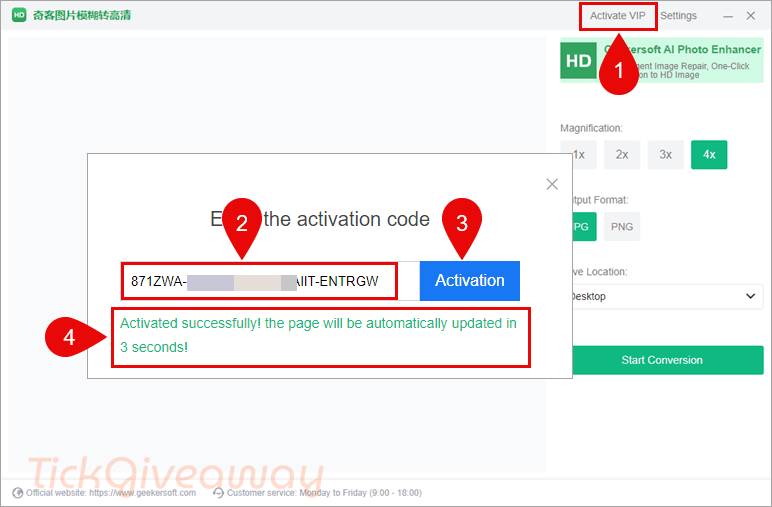
Step 3. Got it for 1-year free!

Who Is This Giveaway Most Useful For?
- People with old family photos that need basic cleanup.
- Users who want faces, backgrounds, or printed details to look clearer.
- Casual users who want better-looking phone photos.
- Anyone who wants photo improvement without learning advanced editing tools.
- Small online sellers who need clearer product images for listings.
- Designers who want to improve image quality before using visuals.
- Content creators who need cleaner images for posting or reuse.
- People who work with portraits, travel photos, or scanned prints.
- Social media users who want to test image enhancement with a one-year license.
Terms & Conditions
- This promotion includes a 1-computer license only.
- The license is valid for 1 year from activation.
- It is offered for noncommercial use.
- You must activate the software before March 31, 2026, 08:00 GMT+0.
- Free updates are included for one year.
- Free technical support is not included.
- The license may not be resold.
- Access and use are limited to the conditions stated by the organizer.



Giveaway overview states:
“Supported platform Windows 7, 8/8.1, 10, and 11 (32-bit and 64-bit)”
It is incorrect, this is a local AI model based program and as such REQUIRES 64bit address space and instructions and cannot possibly run under ANY 32bit edition of windows.
seems very buggy to me and has spurious chinese glyphs on the title bar regardless of what language is selected. for me it kept resetting output folder to desktop despite being manually changed to a less polluting location… also uses NVidia GPU very inefficiently during processing and there are no options to choose any enhancement just offering basic upscaling up to a maximum 4x and doesn’t show the error describing the max input image size of 4000 pixels when one tries dropping a 16384×16384 or 32768×32768 pixel image just silently failing to do anything…
There are no options or settings to:
“Make blurry or low-resolution photos look sharper and easier to view.
Improve old or damaged pictures so memories are easier to preserve.
Enhance portrait photos by bringing out clearer facial details.
Add color to black-and-white images for a more lifelike result.
Reduce visible noise in photos taken on phones or digital cameras.”
Those functions are NOT part of this program!
This is JUST a BUGGY AI UPSCALER probably stealing open source AI upscaler engine and model.
These developers bring the tag of Geek into disrepute!