

 jasmine
 Table of Contents
EaseUS OS2Go Pro Coupon Codes
EaseUS Halloween Sale: Up to 55% Off
Treat yourself to smarter software this Halloween, get up to 55% off EaseUS tools for data recovery, file management, video editing, and more during the 2026 sale.
EaseUS OS2Go Professional (Monthly Subscription) Coupon Code
EaseUS OS2Go Professional (Yearly Subscription) Coupon Code
EaseUS OS2Go Professional (Lifetime Upgrades) Coupon Code
About EaseUS OS2Go
In an age where mobility and convenience are paramount, the need for portable computing solutions has never been greater. EaseUS OS2Go is a groundbreaking tool that allows users to create a fully functional, portable Windows USB drive. With its help, you can make a bootable USB drive that runs Windows 11, 10, 8, or 7 and clone your current Windows system (including apps and settings) to a USB drive.
Additionally, you can use EaseUS OS2GO to boot Windows from any compatible computer. This software ensures you can carry your entire Windows operating system in your pocket, ready to use on any compatible device.
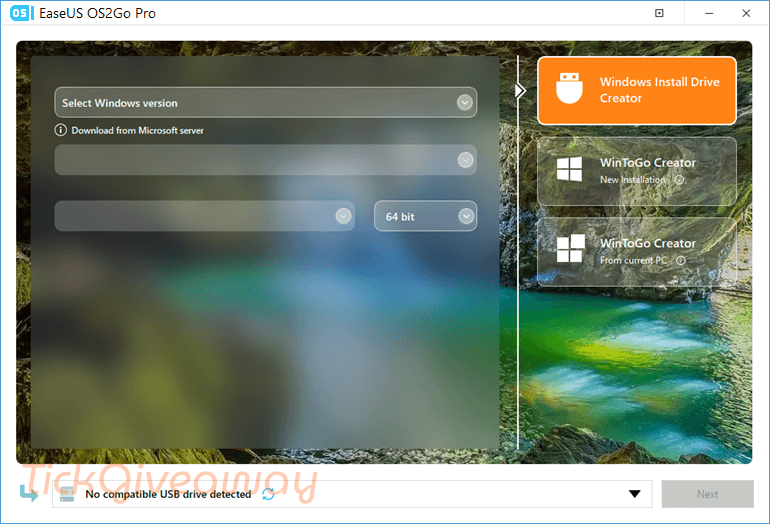
Key features:
- Portable Windows USB Creation: Easily create a bootable USB drive with your Windows operating system, enabling you to use it on any computer.
- Cross-Platform Compatibility: Supports both Windows and Mac, allowing you to run Windows OS on Mac devices without any performance issues.
- Seamless Operation: Ensures all your applications, files, and settings are preserved and accessible, providing a seamless user experience across different devices.
- Multiple Device Support: Compatible with various Windows versions, including Windows 11, 10, 8, and 7, as well as different USB brands.
- User-Friendly Interface: Offers a straightforward, easy-to-use interface that simplifies the process of creating and using a portable Windows drive.
- Cost-Effective Solution: Provides a more affordable alternative to purchasing additional hardware, such as laptops or external hard drives.
- Enhanced Security: Utilizes advanced encryption to ensure the safety and security of your data on the portable USB drive.
Supported OS: Windows 10/8/7
Price: $29.95/year
How to get the EaseUS OS2Go license for free?
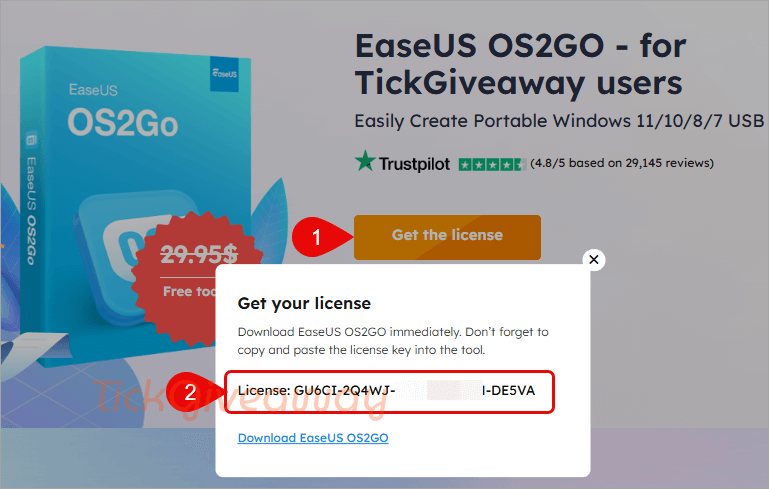
Step 1. Go to the EaseUS OS2Go giveaway page and click on the “Get the license” button to get your free license code.
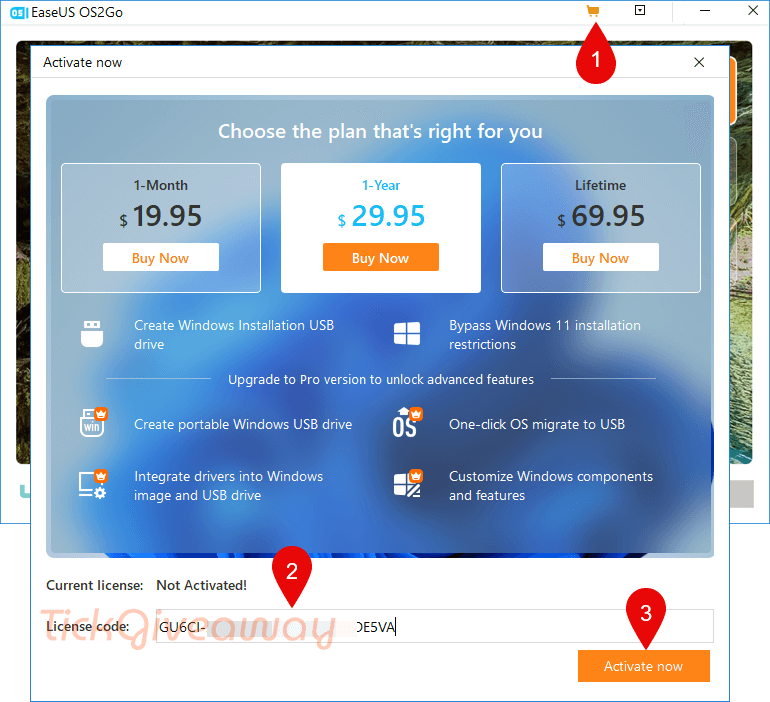
Step 2. Download EaseUS OS2GO and install the software on your computer —> os2go_4.1.0_portable.exe
Launch it, then activate it with your registration code above.
Step 3. Enjoy it for 1-year free!
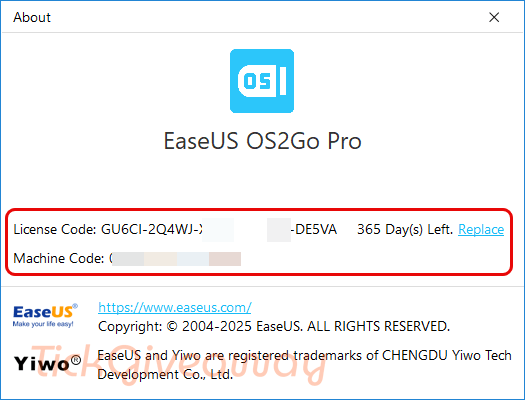
Terms of use
- This is a 1-year license code for v4.1.0
- Non-commercial use
- No free updates
- No free tech support
- Please register before Nov 03, 2025, GMT+0 08:00




Tried to use this to create a Win to Go from a windows 11 ISO running under Win10 and after waiting ages for the 7GB ISO to download it failed to write to a 250GB SATA SSD in a USB caddy… SSD was originally formatted GPT EFI compatible with requisite partitions… even tried deleting all the partitions to let OS2Go format it how it likes but no joy… tried creating a USB Windows 11 bootable installer but EFI boot screen would not show the USB drive as a bootable option… was going to try installing windows 11 directly to the another 200GB+ NTFS partition on the USB SSD… failed! Tried creating a windows 2 go of the current system but that requires a bigger SSD than I have available so failed. All in all FAIL!
The download link is not for OS2GO, its for PCTRANS and the giveb license is also for PCTRANS and not for OS2GO
Get your license
Download EaseUS OS2GO immediately. Don’t forget to copy and paste the license key into the tool.
License: GU6CI-2Q4WJ-XR46E-517ZM-DE5VA
Download EaseUS OS2GO
https://down.easeus.com/product/pctrans_trial?ref=%2Fgiveaways%2Feaseus-os2go.html%3Futm_source%3Dtickgiveaway.com%26utm_medium%3Darticle%26utm_campaign%3Dsishan-202510-easeus-os2go-tickgiveaway.com-hwb
Please use the correct download link on our site: https://d1.easeus.com/os2go/free/os2go_4.1.0_portable.exe
Pro.
On the page to get the license key there is a link provided with the displayed key BUT it links to a file called “pct_trial_installer_20251020.17609727677496b4249406a020344637.exe” to me that is the trial PC Transfer installer NOT the OS2Go installer. It’s NOT the installer for that either but a NSIS packaged downloader for PC Transfer so don’t waste your time downloading from that link, use the one on THIS page here. And although its called “os2go_4.1.0_portable.exe” IT IS NOT PORTABLE! it installs into “C:\Users\[USERNAME]\AppData\Roaming\EaseUSOS2Go4.1.0\os2go and does not clean up after it’s exited so is NOT portable. There is no formal uninstall to get rid of it you have to manually delete the “EaseUSOS2Go4.1.0” folder and it’s contents when the license expires or if you’ve done what you want and don’t need it any more.
Is this just Easeus OS2Go or Easeus OS2Go Pro… there is a difference!
Thank you for sharing this; it is the PRO version.