

 Leona
Leona Table of Contents
EaseUS NTFS for Mac Coupon Code
Special Offer for You: Check out the newest EaseUS coupon codes right here to enjoy 70% Off EaseUS products.
EaseUS Halloween Sale: Up to 55% Off
Treat yourself to smarter software this Halloween, get up to 55% off EaseUS tools for data recovery, file management, video editing, and more during the 2026 sale.
EaseUS NTFS For Mac - 1 Month Coupon Code
EaseUS NTFS For Mac - Lifetime Upgrades Coupon Code
What is EaseUS NTFS for Mac?
EaseUS NTFS for Mac is a powerful NTFS driver software explicitly designed for Mac users. It enables you to write, edit, copy, move, and delete files on Microsoft NTFS volumes. You can also use it to mount and unmount Microsoft NTFS volumes from a Mac. This tool provides smooth access to writing data to all brands of external drives like Buffalo, Western Digital, Seagate, Sandisk, Adata, LaCie, Seagate, etc., on Mac computers. EaseUS NTFS for Mac fully supports Apple Silicon M1, M2, and M3, and macOS Sonoma.
Key Features
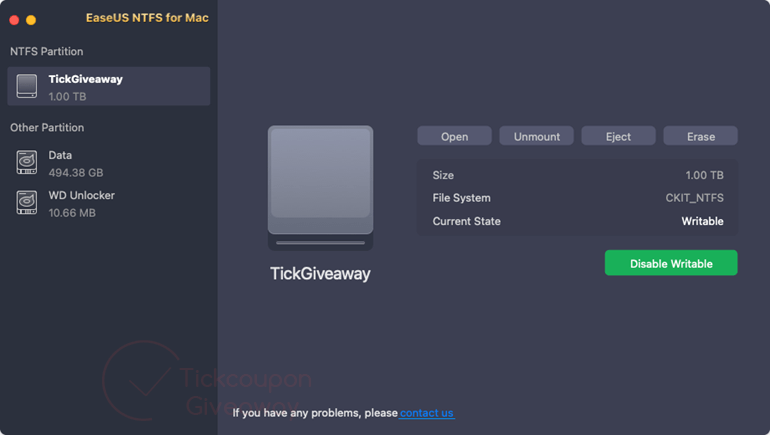
- Read, write, copy, move, rename, and delete files on NTFS-formatted drives (external HDDs, SSDs, USB drives, SD Cards, Thunderbolt drives, etc.) directly from macOS.
- Offers a Status Bar to mount or unmount NTFS volumes automatically.
- Click “Enable Writable” to remove the read-only state and allow full write permissions.
- Prompting you to grant macOS Full Disk Access using System Preferences, Security & Privacy, and Full Disk Access, and then relaunching itself to apply write access.
- Fully compatible with Apple silicon Macs: M1, M2, and M3, including Lion/Pro/Max variants and support for Intel/T2‑chip Macs.
- Supports reading/writing NTFS drives as well as other file systems like APFS, HFS+, exFAT, FAT32, and can format drives to NTFS (or convert from other formats).
- Works with various drive types and brands, including WD, Seagate, SanDisk, Samsung, Kingston, and LaCie, among others.
- Built-in formatting tool: allows you to erase and format drives to NTFS, exFAT, FAT32, HFS+, and APFS via the GUI (eliminates the need for Disk Utility or the command line).
Supported OS: macOS 15 – macOS 10.13
Price: $49.95/lifetime
How to get the EaseUS NTFS for Mac license key for free?
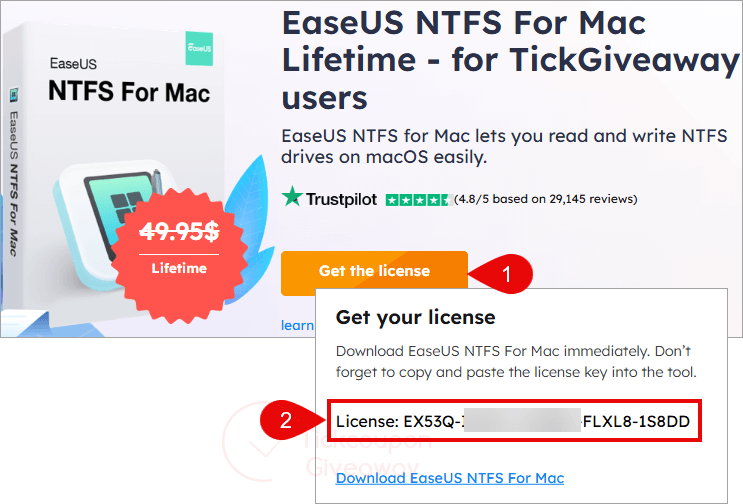
Step 1. Click on the “Get the license” button on the EaseUS NTFS for Mac giveaway link to get your free license code
Step 2. Download the installer for the latest version here: ntfs_for_mac_Setup_20250803.dmg
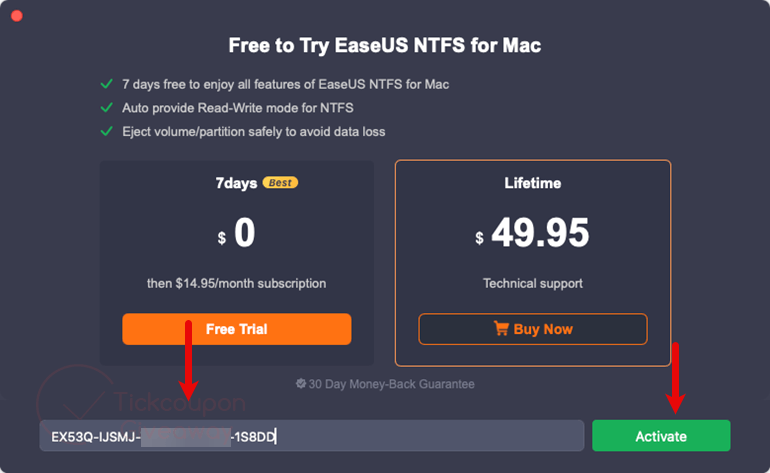
Install this software on your Mac, then launch it. Please copy and paste the license code above to activate the software:
Step 3. Enjoy it for a lifetime for free!
Terms & Conditions
- This is a lifetime license for v3.5
- Non-commercial usage
- No free updates and tech support
- Please register before Aug 11, 2025 GMT+0 08:00



Big shoutout to Tickgiveaway for the lifetime key! Installation was a breeze, and my Mac now handles NTFS like a champ
Super handy tool. It’s easy to get full write access to my NTFS drives on Mac—no hassle at all.