

Giveaway: Ashampoo SHARPEN #5 (Lifetime) – Sharpen Photos with Extraordinary Precision

 Leona
Leona Table of Contents
What is Ashampoo SHARPEN #5?
Ashampoo Sharpen #5 improves blurry or shaky photos by analyzing each image individually. A redesigned sharpening engine with halo suppression and directional motion correction delivers crisp contours and natural results. With Compact and Pro modes, watermark support, super-sampling, focus peaking, and AI-accelerated processing, the software combines efficient optimization with creative control.
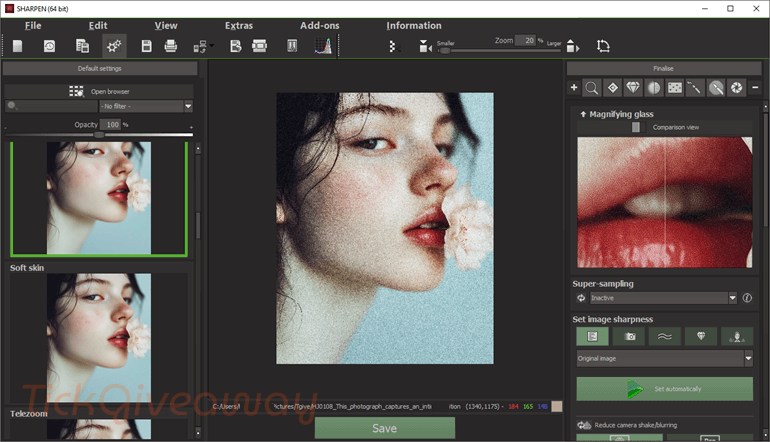
What Does Ashampoo SHARPEN #5 Help You Do?
- Background guard up to 10x faster
- Significantly reduced memory and CPU footprint
- More reliable and precise detection of installation phases
- Better privacy with Privacy Traces Cleaner
- Deletion history for all cleaners
- Detects even complex installation routines
- Also perfect for aged or weaker systems
- State-of-the-art cleaner modules
- Unified Explorer theme plus hot-tracking
- Significantly accelerated snapshot comparisons
- Enhanced security and stability
- Move installed programs across drives instantly
- Export / Import a list of installed applications
- In-depth Registry cleaning with an extended scan for orphaned entries
- Enhanced installation auto-detection through Registry monitoring
- Redesigned reports with Windows app support
- Improved stability of the installation guard and the real-time logger
| Version included | v5.41 |
| License type | Full license for personal use |
| License duration | Lifetime |
| Supported platform | Windows 11, Windows 10 (x64) |
| Original price | $50 |
Ashampoo SHARPEN #5 Giveaway Details & How to Join
Special Offer
Ashampoo SHARPEN #6 Professional
How to Join
Step 1. Download the Ashampoo App from Ashampoo and complete its setup. Sign in to the Ashampoo App with your Ashampoo account.

Step 2. Download the Ashampoo SHARPEN #5 giveaway installer and install the software on your computer.

Step 3. Got it for life, free!
Who Is This Giveaway Most Useful For?
This promotion may be particularly helpful for users who regularly work with photos and want an easier way to improve image clarity.
For example, hobby photographers who edit pictures from travel, events, or everyday moments may find it useful when images come out slightly soft. Instead of repeating manual adjustments in larger editing software, a dedicated sharpening tool can simplify that step.
Content creators who prepare images for blogs, social media posts, or presentations may also benefit. Sharper images often appear more polished and easier to view on screens.
The giveaway may also interest users who shoot in RAW format and want a quick way to enhance detail before exporting images for sharing or printing.
Common Questions About This Giveaway
Do I need an Ashampoo account to activate the software?
Yes. Activation requires logging into an Ashampoo account inside the software.
Does the software support RAW photo files?
Yes. According to the feature list, the software supports a large number of RAW camera formats.




Watch out this installs via adware ashampoo app rather than a normal standalone desktop program