


 Leona
Leona Table of Contents
About Aiseesoft Slideshow Creator
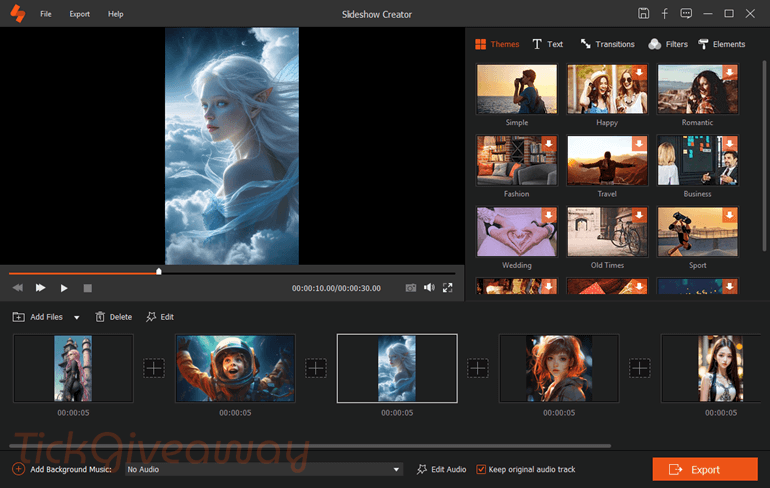
Aiseesoft Slideshow Creator is a simple slideshow maker and editor application that helps you make slideshow videos from your photos, video clips, and music. With its help, you can create wedding videos, birthday slideshows, travel memories, family albums, or short videos for sharing online. It also provides you with many ready-made themes, text styles, transitions, filters, and other effects, so you can make your video look more lively without much effort. Aiseesoft Slideshow Creator also includes simple editing tools for trimming videos, adjusting image effects, adding background music, and customizing each scene the way you want.
Key Features
- Lets you turn photos, video clips, and background music into a slideshow video for birthdays, weddings, travel memories, and more.
- Works with many photo formats, including JPG, JPEG, PNG, BMP, TIF, TIFF, ICO, DIB, JFIF, EMF, and GIF.
- Allows you to adjust brightness, contrast, saturation, hue, temperature, tint, exposure, and 3D LUT settings before exporting your slideshow.
- Helps you fix the angle of photos or videos, crop unwanted parts, and trim large videos into smaller clips.
- Supports fast or slow playback and gives you the option to hide part of a video with a mosaic.
- Includes preset styles such as simple, happy, romantic, fashion, travel, wedding, and old times for faster video creation.
- Lets you build your own slideshow style with text, transitions, filters, and decorative elements.
- Offers 31 text effects and lets you change font, size, color, duration, motion, and text position.
- It comes with 31 transition modes, including fade, mosaic, squares, circle, brush, and diamond, with adjustable duration.
- Provides 32 filters to give your slideshow different looks, such as warm, grey, dynamic, sketch, pixelate, romantic, and more.
- Includes 37 built-in elements like leaves, hearts, snowflakes, smiles, kisses, stars, and other visual extras.
- Lets you preview your slideshow in full screen and save the project for later editing.
- Can loop background music during playback when needed.
- Allows you to set how long each photo stays on screen and apply pan or zoom effects to images.
- Can extract the original background audio from a video file.
Supported OS: Windows 11/10/8/8.1/7
Price: $49.95/lifetime
How to get the Aiseesoft Slideshow Creator license key for free?
Step 1. Fill in your name/your email and tick the “Privacy Policy” checkbox, then click on the “Send registration code” button on the Aiseesoft Slideshow Creator giveaway page
50% OFF Aiseesoft Slideshow Creator Coupon Code

Step 2. In a few minutes, you will receive an email with an annual license:
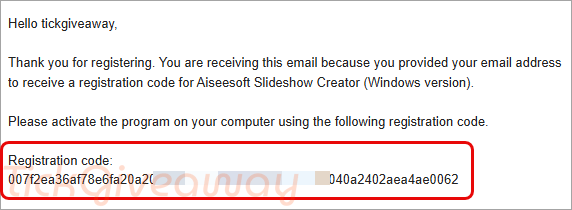
Step 3. Download and install the software on your computer —> slideshow-creator.exe
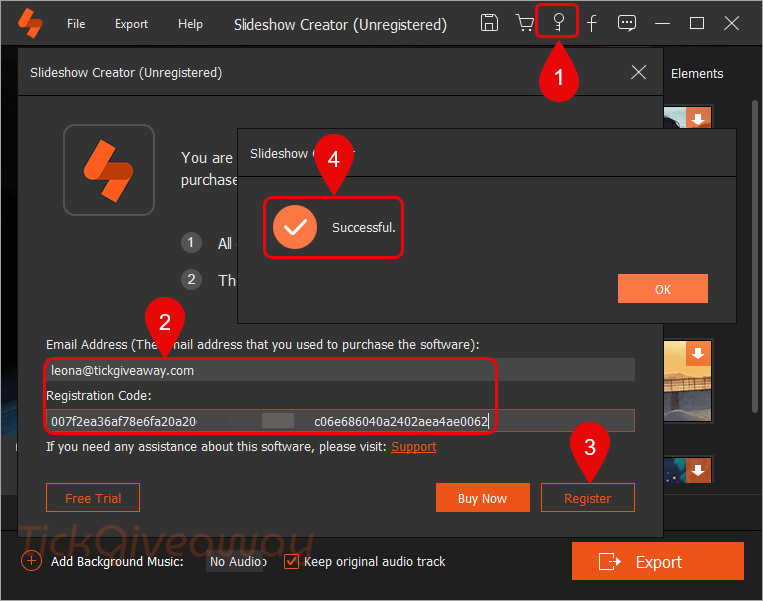
Copy and paste the Email address and Registration code that is shown in your mailbox to activate this software
Step 4. Enjoy it for 1 year free!
Terms & Conditions
- This is a 1-year license for the current version 1.0.68
- Non-commercial usage
- No free updates and tech support




The license offered here is NOT an annual license but a 12 month expiring license if you want an annual license that is a license that RENEWS annually you have to pay. Except they don’t sell an Annual just a monthly license and a lifetime license Current price for a lifetime license is $39.96 NOT the $49.95 advertised here!
i have problem : no audio device found! click ok to close program
Hi,
First, ensure that your computer sound is working.
Then you can check and follow these instructions to fix it: https://www.iobit.com/en/knowledge-how-to-fix-no-audio-output-device-is-installed-error-in-windows-11,-10,-8,-7,-xp-133.php
Second, run the program with admin permission (right-click and choose “Run as administrator”).