

 Leona
Leona 
Table of Contents
What is the SoftOrbits Flash Drive Recovery?
Accidentally deleted files from flash drives or USB drives or device malfunctions always make you get stressed. SoftOrbits Flash Drive Recovery is a comprehensive drive data recovery software that helps you recover files from a flash drive easily and effectively. As the name suggests, SoftOrbits Flash Drive Recovery is an application designed to help you restore your data, including music, documents, videos, etc., from any type of storage media such as flash drives, USB drives, digital cameras, music sticks, PC cards, etc. in many lost data situations. It is simple to use, and you can get your data back in five simple steps. Get it now!

Key Features:
- You can restore the data on your USB flash drive when the deletion or corruption is virus-caused
- It restores files from various storage media, including xD Picture Cards, Smart Media cards, Zip Disks, Sony Memory Sticks, Floppy disks, Secure Digital Cards, Compact Flash cards, Digital cameras, Flashcards, Microdrive, USB disks, and many others.
- It can be used to recover multiple file formats and file types, including music, Word, Excel, and videos.
- It can also be used to preview and restore JPEG, JPG, BMP, GIF, TIFF, PNG, TGA, and other images.
- Allows you to preview and restore RAW images (PEF, CRW, RAF, CR2, NEF, RAW, and other formats).
Supported OS: Windows 7, Windows 10, Windows 11
Price: $21.99/ lifetime
How to get the SoftOrbits Flash Drive Recovery license key for free?
Step 1. Visit the SoftOrbits Flash Drive Recovery giveaway page —> link-1 link-2
EaseUS Data Recovery Wizard Professional (Lifetime Upgrades)
50% off coupon code
Tenorshare 4DDiG - Windows Data Recovery - Lifetime/1 PC
53% off coupon code
iMyFone D-Back- Lifetime Plan Coupon Code
60% off coupon code
50% OFF Aiseesoft Data Recovery - Lifetime Coupon Code
iMyFone AnyRecover - Lifetime Plan Coupon Code
65% off coupon code
Fill in the blanks with your email address, then click the “Request full version key” button
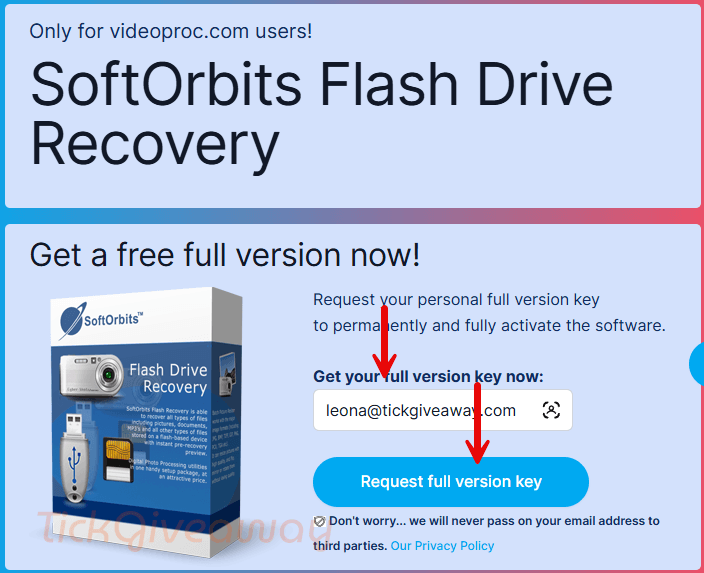
Please complete your basic profile to get your free license code.

Step 2. Download the setup file —> flashrecovery.exe
Install this software on your computer and launch it.

In the main window of the software, click on the “Register” button, then insert your email address and the license key to register it. Use the license code below:
License Code
License code: FDR3-FMKEH-CTTPM-ZCDKE
License code: FDR3-XBHTM-UXCPZ-TTLBS
License code: FDR3-VXDJU-FNZPZ-ZFZZA
License code: FDR3-DVHRH-WEDYW-CEBSL
License code: FDR3-BTDFC-EPSRQ-WHKXT
License code: FDR3-XBHTM-UXCPZ-TTLBS

Step 3. Enjoy it for a lifetime for free!
Terms & Conditions
- This is the lifetime license for the current version.
- No free updates & upgrades.
- Non-commercial use.


program was not designed or built for modern versions of windows, does not even contain the correct embedded manifest data to request elevated rights using UAC prompt… It installs into the logged in users unprotected appdata\roaming sub-folder hierarchy with no option to put it anywhere else, SOS site claims this is version 3.7 but there is no trace of version information within the program or its meta-data, it does not detect a USB FLASH based memory device I tried with it and the readme.txt it installs talks of ancient versions of windows. I advise to stick with developers that know how to program for modern windows based environments by training and not by trial and error… mostly error in this case.
ALL windows data recovery programs require direct access to the hardware media and that requires elevated rights and permission through protected folder access(ransomware protection) Softorbits insistence on installing for non admin users is a contradiction in the purposes of this program as to even see the hardware it needs admin elevated rights… these developers are morons.
After starting, the program closes again.
its awsome thank you