

 january
 Table of Contents
What is O&O DiskImage Premium?
O&O DiskImage Premium lets you back up an entire computer and everything on it whenever you want – even while the computer’s being used. In the event data loss should ever occur, your data can be quickly restored with just a few mouse clicks – even when Windows is no longer able to start. O&O DiskImage also allows you to restore or duplicate an entire PC or partition on a computer whose hardware is different from the original machine, for instance, where you have changed hardware components on the target machine, or have bought a brand new PC and want to restore an old image onto it.

Key Features
- Back up your entire computer, including OS, applications, settings, and personal data, with a single click.
- Choose to back up individual drives, partitions, folders or files instead of the whole system.
- Clone disks or partitions, ideal when upgrading drives or migrating to a new hard drive/SSD.
- After an initial full backup, only the changed data is saved, saving space and time.
- Backup images can be created as virtual disks (VHD or VHDX), useful for virtualization or testing in a virtual environment.
- Set up scheduled backups or hot-plug triggered backups (e.g., run backup automatically when a USB drive is connected).
- The program can automatically detect NAS devices on your local network as backup destinations.
- You can create a bootable USB or rescue medium directly from the program so you can restore your system even if Windows fails to start.
- Cestore backs up to different hardware (e.g., a new PC), with automatic driver recognition and reconfiguration.
Supported OS: Windows 11 and Windows 10; x86, x64,
Price: $49.95
O&O DiskImage Premium 21 Free License Key
Special Offer
O&O DiskImage Premium For 1 PC
O&O DiskImage Premium For 5 PC
O&O PowerPack (Bundle)
Limited time offer: 20% Off O&O Software Coupon for All software
Instruction
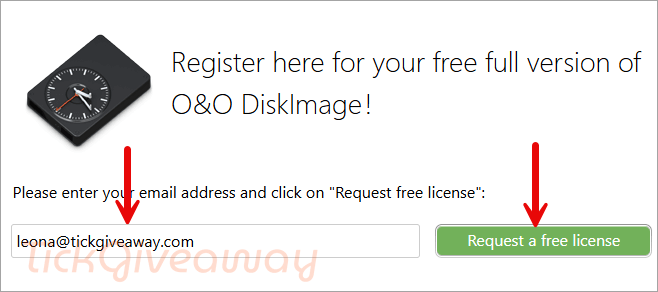
Step 1. Go to the giveaway link. Enter your email address and click on “Request free license.”
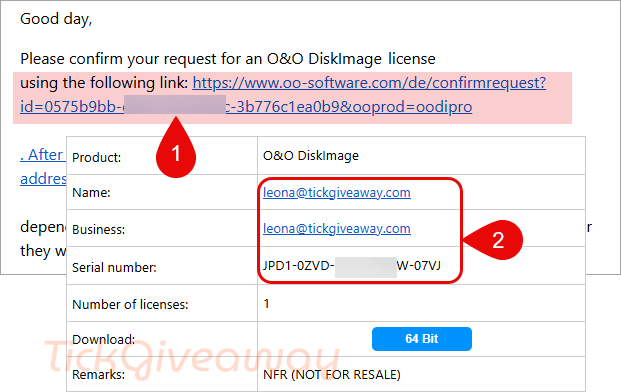
Step 2. As a registration confirmation, you will receive an email. Click on the link to complete the registration. After confirmation, the release code and the download link are sent to the specified email address.
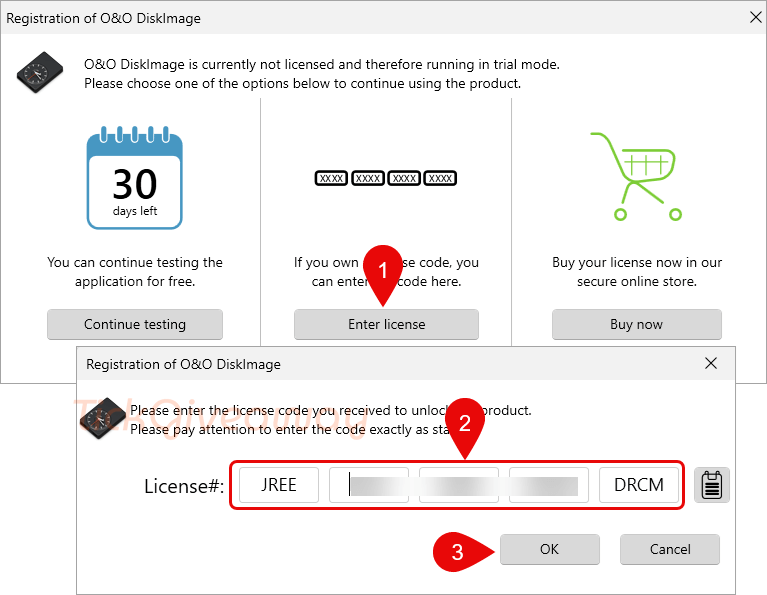
Step 3. Register with your license key
Step 4. Enjoy it!



Link not valid This site can’t be reached
Non ho ricevuto nessuna email….
The Tickgiveaway web site says it can be used for Window systems 11/10/8/8.1/7 (64bit).
But the O&O website site says only 11 & 10.
Which is correct?
Thanks for checking! The latest official info from O&O confirms the current version supports Windows 10 and 11 only. We’ve updated our page accordingly.
Has anyone gotten the email from signing up on the webpage in Feb 2024? I tried two email addresses and checked spam folders it still hasn’t shown up.
Looks like the registration email is taking a while for 17 but look forward to it, appreciate the lifetime license.
Nice list.
Official URL for DL of software:
https://www.oo-software.com/de/download/archive/index.html?product=OODI16PRO
recieve no mail
Please check the spam box or use a new email address to get the license code.
DL links come with confirmation email!
https://dl5.oo-software.com/files/oodiskimage16/165-ks/OODiskImage16Professional64Enu.exe
Thanks for the feedback, the download links are updated.
DL Links do NOT work for v16:
Download O&O DiskImage 16 Pro Installer English version here:
O&O DiskImage 16 Professional Edition 64bit: OODiskImage16Professional64Enu.exe
O&O DiskImage 16 Professional Edition 32bit OODiskImage16ProfessionalEnu.exe
Update new giveaway link for O&O DiskImage 12 Professional Edition 😀