
AutoClose MP3 Hammer Key Free – Segment MP3 Files into Equal-duration Segments

 Leona
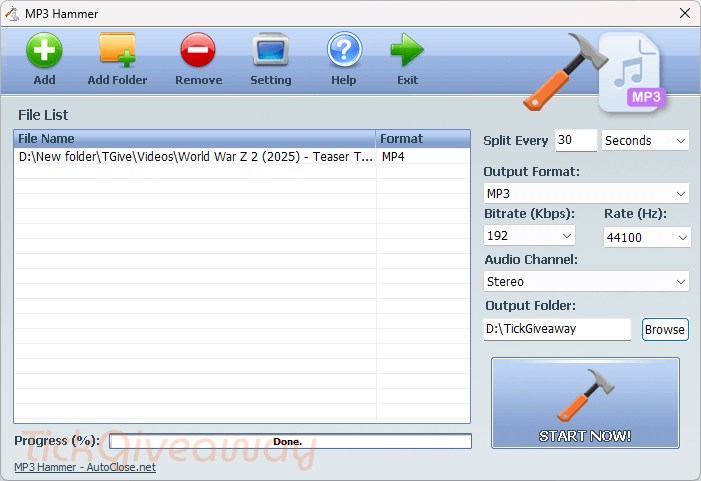
Leona You have a long audio file and want it divided into clear, evenly timed sections without struggling with complicated editing software. AutoClose MP3 Hammer can help. This audio splitting tool is designed to break lengthy MP3 files into smaller, easy-to-manage segments based on the duration you choose. AutoClose MP3 Hammer also supports batch processing, letting you add multiple MP3 files at once and apply the same splitting settings to all of them in a single operation.
Table of Contents
What Does AutoClose MP3 Hammer Help You Do?
- Divide long audio files into smaller segments based on a fixed time length.
- Process multiple MP3 files at once using the same duration settings.
- Create evenly timed audio parts for easier navigation and playback.
- Prepare large audio files for devices with size or length limits.
- Organize lengthy recordings into manageable, sequential files.
AutoClose MP3 Hammer Giveaway Details & How to Join
This giveaway has ended.
Stay tuned - we publish new giveaways every day.
Special Offer
33% Off AutoClose MP3 Hammer Coupon Code
44% Off AutoClose MP3 Hammer - 10 Licenses Coupon Code
How to Join
Step 1. Download the giveaway installation. Install the software on your computer.

Step 2. To activate the software, please click on the “Register MP3 Hammer Now!” button

Use the license code to register the software.

Step 3. Got it for a lifetime for free with full functions!

Who Is This Giveaway Most Useful For?
- Students or educators who work with long lecture recordings and want consistent study segments.
- Audiobook listeners who need smaller files for portable or older playback devices.
- Podcast creators or listeners managing extended, single-track recordings.
- Users who frequently upload or share audio files and prefer predictable file sizes.
Common Questions About This Giveaway
Does this giveaway include all core functions?
Yes, the activated giveaway version provides full access to the main splitting features available in version 1.0.
Will my audio quality change after splitting files?
AutoClose MP3 Hammer is designed to cut files by duration without re-encoding, so original audio quality is preserved.
What happens if I update the software later?
Updating the giveaway version may cause it to become unregistered, according to the terms provided.




Personally I DO NOT BELIEVE THIS SPLITS WITHOUT RE-ENCODING there is NO option to not re-encode! the output format is specified as if it is going to be re-encoded there is NO COPY option without re-encoding. It is hypothetically possible to do that but not with this GUI as the GUI only includes parameters to re-encode. I strongly suspect this current build is a SCAM,
I just tested this on an 8 hour mp3 recording and the command-line passed to conv.exe includes instructions to re-encode the segments NOT copy them. This giveaway is an illegal IP stealing program which does NOT do what it claims. IT IS A SCAM!
It is foolishness to trust an IP thief to tell you the truth about the product they are producing.
We also cannot cancel the conversion once it’s started… guess i’ll have to use task manager and end the conv.exe process.
It did not detect the forced end task on conv.exe as a failure and assumed the conversion completed successfully so it’s not even checking the code returned by the spawned conv.exe process for success or failure! amateurs.
Another program design ERROR that emphasises the amateurish nature of these developers they install into Program Files (x86) by default which is WRITE PROTECTED against un-elevated writes by default, yet places the settings.ini file in the install folder and relying upon an ancient Vista system to virtualise unauthorised writes to a VirtualStore hierarchy designed for badly designed XP and windows 98/ME programs that could write to Program Files hierarchy. The settings.ini and setup.ini should both have been placed into a uniquely named subfolder of the logged in users AppData\Roaming folder so it can be both read and written and not conflict with other similarly named files.