

ThunderSoft PC Optimizer Key Free – A PC Cleaner and System Optimizer Software

 january
 ThunderSoft PC Optimizer is a tool made for PC optimization on Windows computers. It helps users clean junk files, remove large and duplicate files, and free up memory so the system can run more smoothly. If your computer feels slow or shows errors, this program gives you simple options to fix common problems.
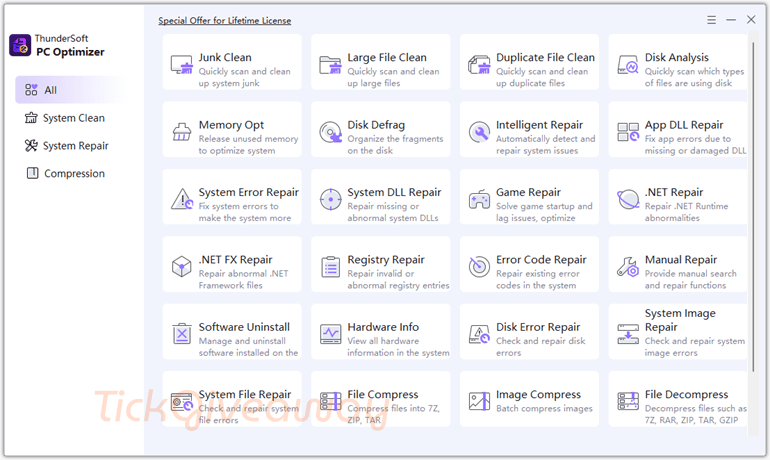
It can repair missing DLL errors, fix some game startup or lag issues, and check for disk or registry problems. You can also uninstall unwanted programs and see basic hardware information in one place. Besides cleaning and repair, it supports file compression and decompression, and even helps recover deleted files. ThunderSoft PC Optimizer is designed for people who want an easier way to manage and maintain their PC without doing everything manually.
Table of Contents
What Does ThunderSoft PC Optimizer Help You Do?
- Remove junk files, large files, and duplicate items that take up storage space.
- Identify which file types are consuming disk space.
- Release unused memory to improve system responsiveness.
- Detect and repair common Windows errors, including missing DLL issues.
- Fix certain game startup and lag-related system problems.
- Recover deleted or lost files from your computer.
| Version included | v11.6.0 |
| License type | Full version, 1-computer license |
| License duration | Lifetime use (no expiration) |
| Supported platform | Windows 11 and Windows 10 |
| Original price | $29.99 |
ThunderSoft PC Optimizer Giveaway Details & How to Join
This giveaway ended on .
The terms and product details above stay on record. Stay tuned - we publish new giveaways every day.
Special Offer
70% Off ThunderSoft PC Optimizer
93% Off Advanced SystemCare 19 PRO with 3 Free Gifts
Wise Care 365 Pro (Lifetime/ 3 PCs)
70% Off Glary Utilities PRO (1 year subscription for up to 3 PCs)
61% Off Kerish PC Doctor (1-Year License)
How to Join
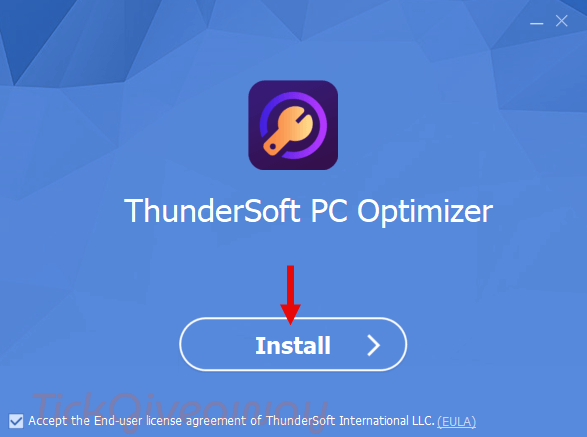
Step 1. Download the giveaway installer from the official ThunderSoft link provided on the giveaway page. Install the software on your Windows PC.
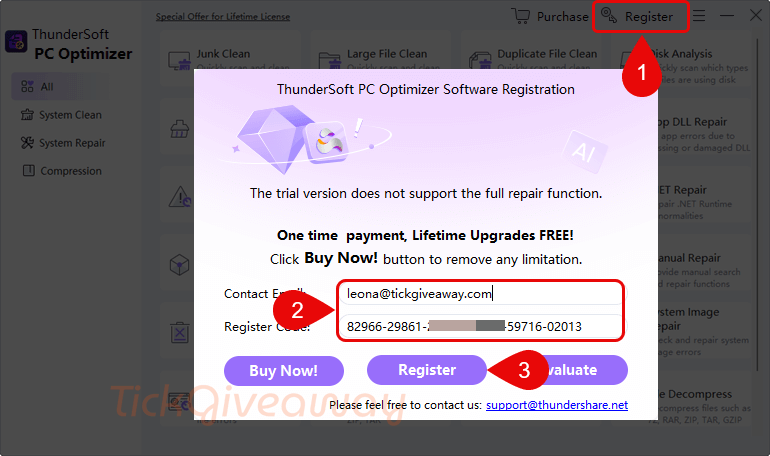
Step 2. Open the program and register it using the license code you received before the offer expires.
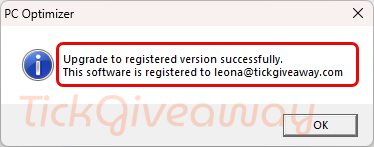
Step 3. Got it for a lifetime free!
Who Is This Giveaway Most Useful For?
- Users whose Windows PC feels slower than usual due to accumulated junk or leftover files.
- Gamers experiencing startup errors or lag linked to system configuration issues.
- Individuals who frequently install and uninstall programs want a simpler way to manage them.
- Anyone who wants basic system repair and cleanup tools combined in a single application.
If you prefer a one-time setup without ongoing subscription fees, this lifetime license may be worth considering.
Common Questions About This Giveaway
Is this the full version or a trial?
This giveaway provides a full-version license for v11.6.0, not a time-limited trial.
Does the lifetime license include future upgrades?
No. Free updates are not included with this license.
Can I install it on multiple computers?
No. The license is valid for one computer only.
What happens if I miss the activation deadline?
If the license is not redeemed before the specified deadline, it may no longer be valid.
Is technical support included?
Free technical support is not included with this promotional license.




didn’t see your reply before i ran this as you said not good
thanks for posting
This isn’t any good ran check it ran 3 days still didn’t finish said almost every .dll file has a problem. I finally canceled it ran Malwarebytes found potential unwanted program in .dll, did VirusScan from boot again found traces of unwanted program. I deleted it and did a clean install of my system don’t trust it and if you look at options only English and Chinese so to me not safe.
Thanks for sharing your experience.
A scan running for an unusually long time and flagging many system DLL files can definitely be concerning. In most cases, system optimization tools may detect entries related to missing references or registry items rather than actual damaged DLL files — but if security software flags something as a potential unwanted program (PUP), it’s always wise to be cautious.
Regarding the language options (English and Chinese), that alone doesn’t indicate whether a program is safe or unsafe — many legitimate developers simply support limited languages.
If you feel uncomfortable or unsure, it’s absolutely the right decision to uninstall the software and rely on tools you trust. System safety should always come first.
Appreciate you taking the time to share your feedback.
On wayback internet archive machine the only archived example of the products home page was on Feb 20 2026 nothing crawled before then! I sincerely doubt this is version 11.6 of a mature program. Had a search of the web for it and it only appears in relation to THIS giveaway and the product home page does not appear in lists or PC optimzers… Disk repair claimed “Deep scan and repair physical bad sectors just spawns standard Windows CHKDSK which has NO facility to repair physical bad sectors at best it can Scan for bad unreadable sectors and just marks them as bad in the filesystem so they won’t be used again… NOT force remapping them by forcing an write to them which would instigate a logical remap of the bad sector from the spare good sectors all modern IDE drives maintain for this purpose. This is more than likely a scam product parts work under Vista and other parts require a newer version of windows it is NOT a single program but collection of programs/wizards. It also includes a 3rd parties defragmenter jkdefrag it is an illegal distribution as its binares are released under GPL and that is not compatible with thundershares closed source license… as usual Chinese commercial developers steal intellectual property from others around the world, hiding behind Chinese legal system. ODDLY the HOME link in some of the sub-programs goes to https://gilisoft.com/total-repair.htm Are gilisoft thundershare or did thundershare just buy rights to rebrand and resell it? The install script rebrands it to thundershare domain instead of gilisoft product has pages archived going back to 2025 but even then it starts at version 10.0 looks like the Chinese are exaggerating the version number by a factor of 10 like they do on Temu and Aliexpress for powerbank capacities and so on. I note I de-selected the installer options to create quicklaunch and desktop shortcuts but it IGNORED the choice and still dumped the shortcut on my desktop enough is enough uninstalled with prejedice.