

Vovsoft Batch Audio Converter Key Free – Bulk Audio Format Conversion

 january
 Table of Contents
What is Vovsoft Batch Audio Converter?
To convert many audio files at the same time quickly and safely, using a specialized tool like Vovsoft Batch Audio Converter is considered a perfect choice. The audio conversion software can convert bulk audio files simply and smoothly. VovSoft Batch Audio Converter stands out from the rest because of its intuitive user interface. With the interface, all you need to do is drag and drop your files, choose your desired format, and let the software handle the rest for you.
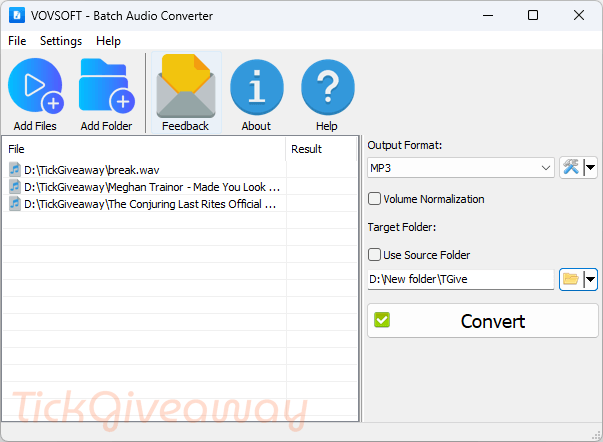
Furthermore, the Vovsoft Batch Audio Converter is designed with a loudness normalization capability that ensures that all your audio files maintain a consistent volume level. It applies the industry-standard EBU R128 loudness normalization method, a benchmark set by the European Broadcasting Union that is widely recognized and adopted by audio professionals worldwide. This feature automatically adjusts the loudness of your audio files to achieve uniform volume levels across different tracks, eliminating abrupt volume changes that can disrupt the listening experience.
Key Features
- It supports over 20 input and output audio formats, including MP3, WMA, WAV, M4A, AIFF, AAC, OGG, OPUS, etc.
- It is developed with a fast conversion speed, enabling it to process large batches of files quickly.
- It preserves the original quality of your audio files during conversion.
- It offers a user-friendly interface to simplify the conversion process for all users.
- It includes the Loudness Normalization feature, which analyzes each audio file and adjusts its volume based on the EBU R128 algorithm.
Supported OS: Windows 11, Windows 10, Windows 8/8.1, Windows 7 (32-bit & 64-bit)
Price: $19.00/lifetime
How to get the Vovsoft Batch Audio Converter license key for free?
Step 1. Download the installer v1.7 –> batch-audio-converter.exe batch-audio-converter-portable.zip
After installation, open the software and click on the “Help\Edit License…”
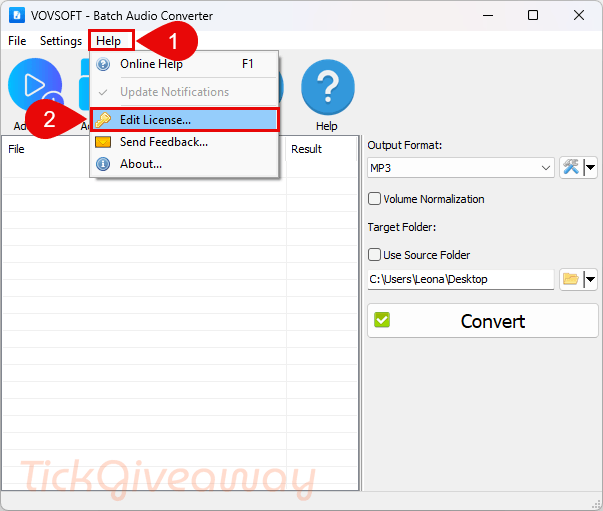
Step 2. Copy the activation code below and activate Batch Audio Converter to the full version:
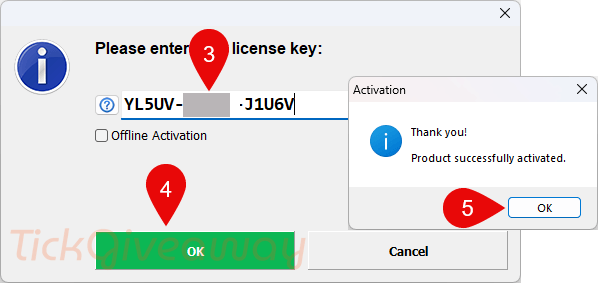
Giveaway License
Vovsoft Batch Audio Converter
98% Off Vovsoft Universal License lifetime coupon
Step 3. Enjoy it for a lifetime for free!

Terms & Conditions
- This is a lifetime license for version 1.7
- Non-commercial usage
- No free updates and tech support
- Activate this code before Mar 24, 2026, GMT+0 08:00

the bullet points above state a blatantly misleading:
“It preserves the original quality of your audio files during conversion.”
during the conversion it might maintain original quality but by conversion it reduces the quality as almost all the codecs are lossy. And in some cases it has to convert sample rate or bit depth to be compatible with the destination codec which in itself will damage the quality of the bit-stream introducing errors.
The vast majority of the supported codecs are lossy codecs and compress by removing data/quality from the original data it is mathematically impossible to preserve the quality when encoding with a lossy codec e.g. MP3, WMA, WAV, M4A, AIFF, AAC, OGG, OPUS Yes even WAV which is only a container format and can contain almost any lossy codec encoded content as well as PCM which is uncompressed so lossless. It also supports FLAC which can be lossless IF the sample-rate and bit-depth match the input specification.