


 Leona
Leona Table of Contents
What is the Vovsoft Watermark Video?
Vovsoft Watermark Video, as its name suggests, is a program that lets you apply text watermarks to your video footage. This tool’s primary purpose is to apply a watermark to make your films copy-proof.
A further benefit of Vovsoft Watermark Video is that batch processing is supported. This is particularly helpful if you wish to insert numerous clips at once. Also, you can choose from four other locations for the watermark to appear: top-left, top-right, bottom-left, or bottom-right.

Key Features
- Vovsoft Watermark Video allows you to add watermarks to your videos and protect your intellectual property.
- It allows you to add as many clips as you want at once.
- You can also use it to adjust the position and size of the watermarks to fit your needs.
- The software supports exporting videos to a wide range of video formats, including MP4, MKV, AVI, MPEG, MOV, WMV, and FLV.
Supported OS: Windows 11, Windows 10, Windows 8/8.1, Windows 7 (32-bit & 64-bit)
Price: $19/lifetime
How to get the Vovsoft Watermark Video license key for free?
Step 1. Download the installer for Vovsoft Watermark Video version 2.2 –> watermark-video.exe watermark-video-portable.zip

Step 2. When the installation is done, launch it. To register the software, please use the Vovsoft Watermark Video license code:
30% Off Vovsoft Watermark Video coupon
98% Off Vovsoft Universal License lifetime coupon
License Code
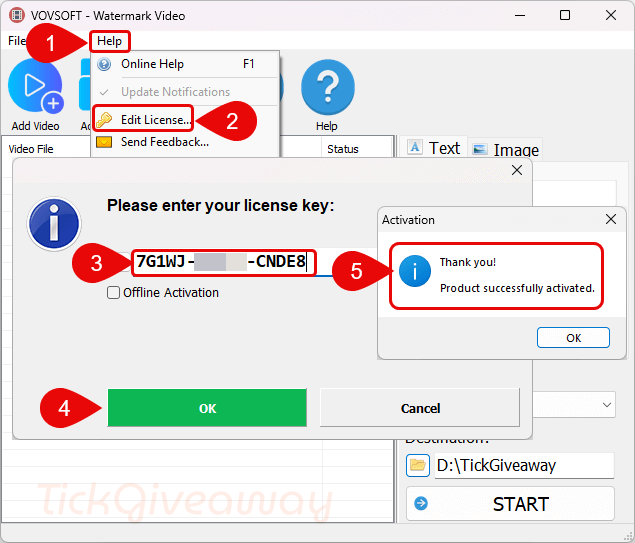
Step 3. Enjoy it for a lifetime free with full functions!

Terms & Conditions
- This is a lifetime license for Vovsoft Watermark Video v2.2
- No free updates
- You must download and install the giveaway before Feb 09, 2026
- May not be resold





While the main executable is a 32bit application the LGPLv3 licensed FFMPEG.EXE included in both the installer and the portable is a 64bit executable and NEEDS to be replaced with a 32bit edition IF the program is to function under 32bit editions of windows. AS SUPPLIED THE PROGRAM IS UNSUITABLE FOR 32bit Editions of Windows Vista to Windows 10