Vovsoft Rename Multiple Files Key Free – Fast and easy batch renamer

 Leona
Leona Table of Contents
What is the Vovsoft Rename Multiple Files?
If you enjoy keeping your computer well-organized, you’ll appreciate a tool that can rename multiple files simultaneously. Manually renaming files one by one is time-consuming, but Vovsoft Rename Multiple Files streamlines this process. This compact and user-friendly software allows you to batch rename files effortlessly. With customizable settings like automatic incrementation, you can tailor the renaming process to your needs. Despite its small memory footprint, it can handle folders with over 100,000 entries and rename thousands of files in seconds.
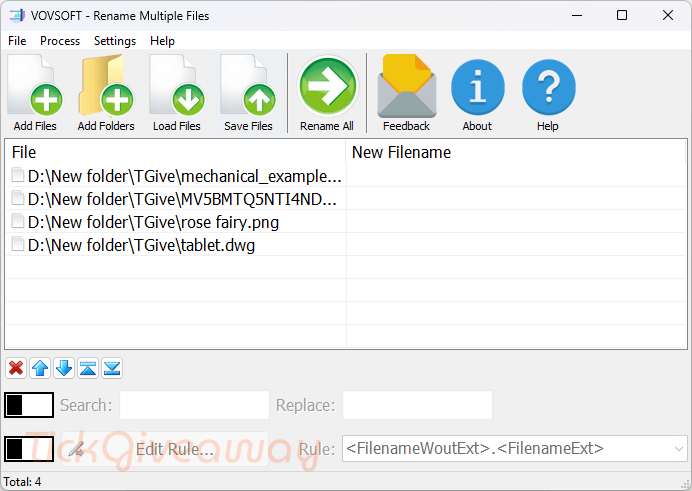
Additionally, it supports CSV files for bulk renaming, making it ideal for systematic projects. Whether you’re organizing media, managing documents, or standardizing filenames for business, Vovsoft Rename Multiple Files simplifies the task. Just edit your CSV file in a spreadsheet program like Excel, import it, and let the software do the rest, saving you time and effort.
Key Features:
- Rename many files in batch mode
- To begin a task, you can add as many files as you want to the list
Supported OS: Windows XP, Vista, 7, 8/8.1, and 10/11
Price: $19/lifetime
How to get the Vovsoft Rename Multiple Files license key for free?
This giveaway ended on .
The terms and product details above stay on record. Stay tuned - we publish new giveaways every day.
Special Offer
Vovsoft Rename Multiple Files
Vovsoft Universal License lifetime
Instruction
Step 1. Download the installer for Vovsoft Rename Multiple Files version 2.4.
Step 2. Install the software on your computer

Step 3. Enjoy it for a lifetime for free!