


 january
 Table of Contents
What is SoftOrbits Icon Maker?
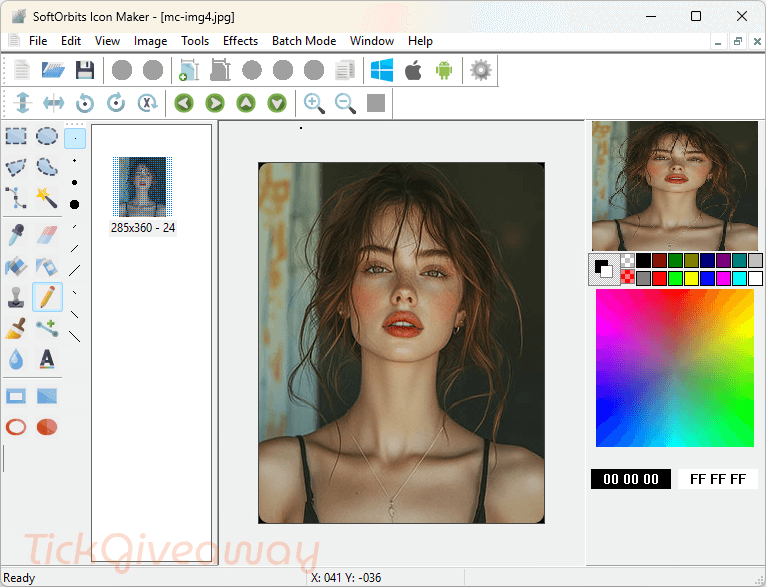
SoftOrbits Icon Maker is an easy-to-use tool for making great application icons. It helps you make great application icons and banners. With it, you can create icon files or edit, extract, convert, and manage the existing ones. This tool also supports batch processing and allows a user to perform a lot of operations simultaneously with many images.
It works with a wide range of image formats, including JPEG, GIF, PNG, CUR, BMP, ICO, ANI, XPM, ICL, TIFF, and Photoshop. Additionally, SoftOrbits Icon Maker offers features for creating graphical processing cursors (.cur) and provides a variety of special effects, color correction functions, and animation effects to enhance your designs.
Key Features
- SoftOrbits Icon Maker is designed to help you create icon files effortlessly with an intuitive file management system.
- It is compatible with various image formats, including JPEG, GIF, PNG, CUR, BMP, ICO, ANI, XPM, ICL, TIFF, and Photoshop.
- You can also use it to create icons for multiple operating systems, such as Windows, Android, and iOS.
- Perform operations on multiple images simultaneously, such as converting several Mac icons to Windows format.
- Includes a rich set of drawing tools and editing options like color inversion, image sharpening, and transparency adjustment.
- The icon extraction function can extract icons from EXE and DLL files for editing and saving.
- The advanced effects function helps you apply various effects like waves, ripples, wind, and cartoons to your icons.
- This tool also supports the creation and editing of animated icons.
- Includes a comprehensive user manual with practical recommendations
Supported OS: Windows 11/10/8/8.1/7 (32-bit and 64-bit)
Price: $21.99/ lifetime
How to get the SoftOrbits Icon Maker license key for free?
Step 1. Visit the SoftOrbits Icon Maker giveaway page –> link-2
20% Off IcoFX 3 Business License Discount Code
20% Off IcoFX 3 Site License Coupon Code
15% Off CoreUI Icons PRO Coupon Code
DesignEvo Logo Maker Basic
65% Off DesignEvo Logo Maker Basic Coupon Code
DesignEvo Logo Maker Plus
65% Off DesignEvo Logo Maker Plus Coupon Code
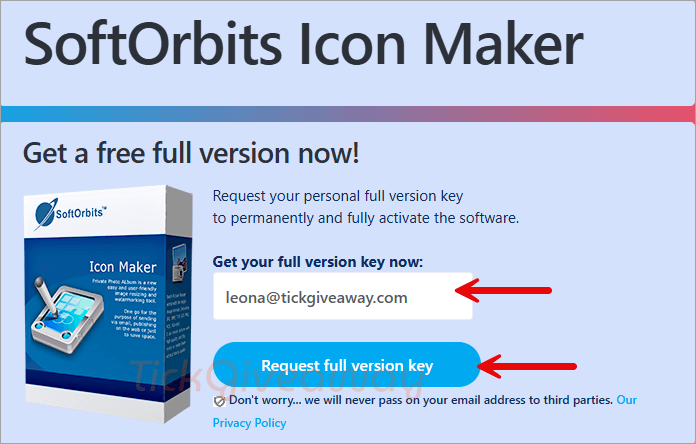
To get your full version key, please insert your email address, click on the “Request full version key” button, and then fill in all fields to complete your basic profile.
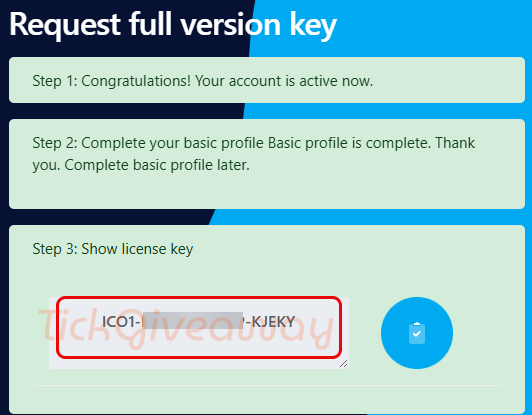
Step 2. Complete your basic profile, then click on the “Done. Continue!” button to get your free key
Step 3. Download the software on your computer —> IconMaker-Setup.exe
Then, install the software on your computer. After installation, open it. To use SoftOrbits Icon Maker with full features, insert your license to activate the software. Use the license code below:
License Code
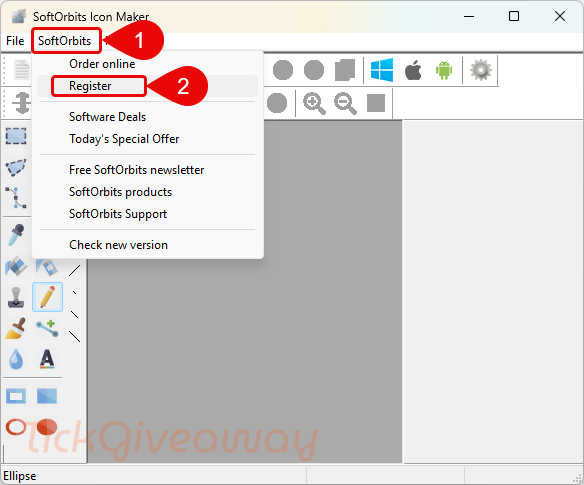
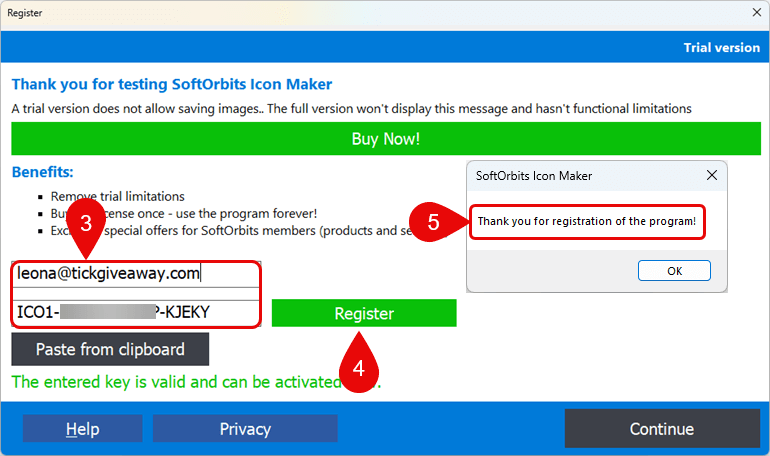
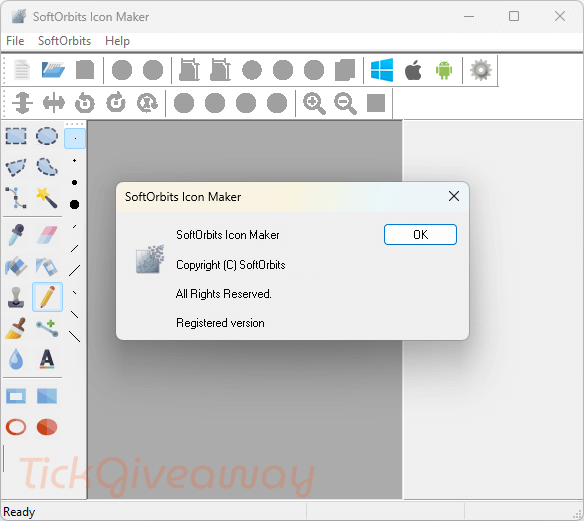
Step 4. Completing the SoftOrbits Icon Maker setup wizard and enjoying it for a lifetime for free!
Terms & Conditions
- This is a lifetime license for version 1.9
- Non-commercial use
- No free updates
- No free tech support
- You must redeem the license key before this offer ends.


Note the installer is a downloader that downloads an installer about 9MBytes that installs into the insecure userappdata softorbits subfolder on the system drive with NO option to put it anywhere else… I have extracted the installer contents and edited the install script so that it defaults to C:\program files (x86)\ hierarchy but can be placed anywhere you have write rights to. and recompiled the installer with a version 5.x inno installer compiler to create a NORMAL installer, yes it does default to asking for admin rights but if you don’t have admin rights you should not be installing programs yourself… obviously the installer is NOT digitally signed as I don’t own a CA authorised signing certificate. But if you want to install this under Vista or even XP where it is likely to be runnable you can try my installer from:
1drv.ms/u/c/7b9579408151242e/EadORk6GsZBNj5VGreXAIEoBUgE3b9YahnivILB9d-Zpcg?e=Qj2byW
Please feel free to scan the file with virustotal before running OR just extract the contents using innoextractor yourself and manually install it where you want.
It won’t run under XP as the main executable was linked to require NT 6.0 (Vista) or above.